Your Google Ads clicks are climbing but conversions are nowhere to be found — sound familiar? Click fraud could be quietly draining your budget and wrecking your metrics. Learn how to spot the culprits, understand what it's really costing you, and lock down your campaigns for good.
Click fraud prevention starts with understanding what Google's built-in filters actually cover — and where they stop. When competitors, bots, or click farms click your Google Ads with no intent to convert, Google catches some of it automatically. The problem is the rest: sophisticated invalid traffic (SIVT) that mimics human behaviour well enough to pass through Google's filters and charge your account as if it were real. Ad fraud is projected to cost advertisers $172 billion globally by 2028, up from $88 billion in 2023.
This guide covers how to detect click fraud on Google Ads, what Google's new Invalid Activity Credit Report actually tells you, and how to build layered protection that stops invalid spend before it happens — not just credits it after.
Google's automated systems filter invalid clicks before they appear in your reports — and the credits you see in your Billing & Payments section represent the traffic Google already caught. The problem is what Google classifies as general invalid traffic (GIVT): simple bots, duplicate clicks within a short window, and clicks from known data centre IPs. These are relatively easy to catch.
What Google struggles with is sophisticated invalid traffic (SIVT): AI-driven bots that mimic human browsing behaviour, residential proxy networks that mask their origins, and coordinated manual click farms where real humans click ads at industrial scale. SIVT bypasses most signature-based detection because it looks, at the session level, like a legitimate user.
Spider AF platform data shows a 12.79% fraud rate in short-form video ad campaigns, and 92% of detected invalid activity falls into the click-spamming category — the type that generates clicks at scale to exhaust budgets. Google's filters handle a portion of this, but a meaningful fraction slips through.
Related reading: When Google Ads click fraud protection may not be enough
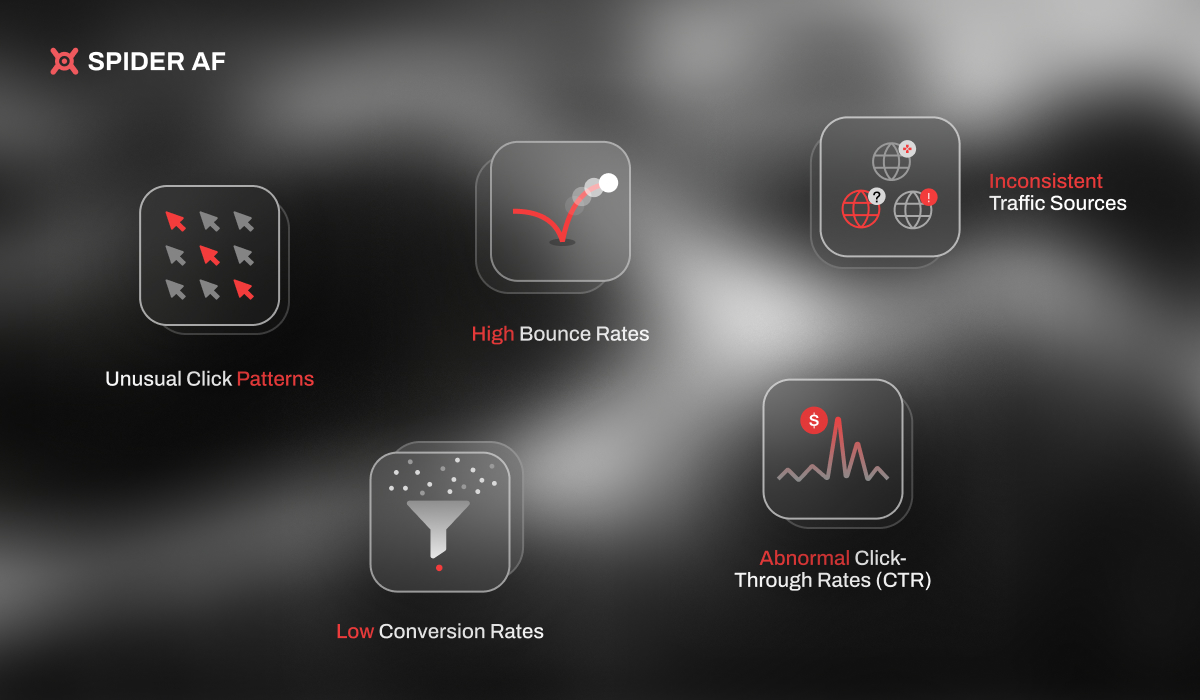
Click fraud doesn't always look like an obvious anomaly. Watch for these patterns across your Google Ads account:
Any single signal might have an innocent explanation. Two or more occurring simultaneously is a strong indicator of fraudulent activity.

Understanding the source helps you choose the right countermeasure.
A competitor manually clicks your ads — or hires a service to do so — to drain your daily budget and push your ads off the SERP for the rest of the day. Google's 30-minute duplicate-click filter catches obvious repetition from the same IP, but a competitor using a VPN or rotating residential proxies can evade it. This is most common in high-CPC industries such as legal, finance, and insurance, where a single click costs $30–$100.
Organised operations where individuals are paid to click ads on mobile devices. Because each click comes from a different real device and user account, they look entirely legitimate to Google's filters. Click farms are concentrated in regions with low labour costs, which is why unusual geographic clusters in your data are a reliable detection signal.
Malware-infected devices run scripts that click ads in the background without the device owner's knowledge. Advanced botnets use residential IPs, simulate mouse movements, and vary click timing to mimic human behaviour. SIVT of this type is specifically designed to survive Google's detection.
On the Google Display Network, publishers earn revenue each time a visitor clicks an advertiser's ad. Fraudulent publishers inflate their traffic with bots to maximise earnings before Google catches and removes them. This makes Display campaigns significantly more exposed to invalid traffic than Search campaigns.
On Android, malicious apps intercept the INSTALL_REFERRER broadcast when another app begins downloading. The fraudulent app fires a fake click milliseconds before the install completes, stealing last-touch attribution credit from the channel that actually drove the download. Click injection is virtually undetectable without click-to-install time (CTIT) analysis — legitimate installs register CTITs of 30 seconds to several hours; click injection produces CTITs under 10 seconds.
.jpg)
In June 2026, Google introduced the Invalid Activity Credit Report — a campaign-level breakdown of the invalid click credits your account has received. Previously, this data was only available in aggregate at the billing level. The report now shows which campaigns received credits, how many clicks were credited, and the associated spend recovered.
This is useful for identifying which campaigns are most targeted and for making the case internally that fraud is a real budget problem. But the credit report has one important limitation: it shows what Google already caught. Invalid activity that passed Google's filters is not reflected in the report — and this is precisely the traffic that costs advertisers the most.
If you believe Google has missed invalid clicks not reflected in your credits, you can request a manual review:
Credits are issued retroactively against past spend. They do not prevent future fraud — you still need to address the source of invalid activity to protect future campaigns.
Most of these can be implemented directly in Google Ads today, without third-party software. They won't eliminate fraud entirely, but they reduce attack surface and raise the cost of targeting your campaigns.
Google Ads allows you to exclude specific IP addresses from seeing your ads. When you identify IPs generating suspicious click patterns — high click volume, zero conversions, unusual hours — add them to your IP exclusion list. The current limit is 500 IP addresses per campaign, which sounds like a lot but fills quickly when facing coordinated botnet traffic.
Priority IPs to exclude: data centre IP ranges (AWS, Google Cloud, Azure), repeated clickers from your analytics data, and geographic ranges outside your target market.
Display Network fraud is significantly higher than Search fraud. Review your placement report regularly and exclude placements with high click volume and zero conversions. For most advertisers, excluding mobile apps entirely from Display campaigns (unless specifically testing app inventory) reduces invalid traffic materially.
If you see click clusters from regions with no historical conversion activity, tighten your geographic targeting to exclude those regions. Be careful not to exclude regions that might be legitimate traffic sources — use conversion data, not just click data, to make this judgement.
Review your hour-of-day performance data. If fraudulent clicks cluster in specific hours (typically late night or early morning when your sales team is offline), reduce bids or pause campaigns during those windows.
Mobile traffic has historically higher invalid click rates than desktop, partly because click farms operate predominantly on mobile devices. Consider reducing mobile bids by 15–25% as a starting position, then calibrate based on your own conversion data by device.
The steps above are reactive — they address fraud after it has happened. Real-time detection tools like Spider AF analyse click patterns as they occur, identify suspicious behaviour (abnormal CTIT, unusual session fingerprints, known bot signatures), and block invalid clicks before they consume budget. This is the only layer that prevents the spend in the first place rather than recovering it after the fact.
An IP exclusion list is only as good as the intelligence behind it. Here's how to build one that reflects the actual threat to your campaigns.
In Google Ads, navigate to Reports → Predefined Reports → Other → Click Type Report. Filter for Search Network campaigns and sort by clicks over the past 30 days. Cross-reference with Google Analytics to identify sessions with zero engagement (bounce rate 100%, duration 0 seconds).
Look for IPs or IP ranges that appear multiple times in your click log within short windows. A single IP clicking your ads 15 times in a day is almost always fraudulent — a human browsing naturally doesn't behave that way. Flag IPs generating more than 5 clicks per day with zero conversions.
Cross-reference suspicious IPs against published data centre IP ranges. Data centre IPs clicking ads are almost universally bots — legitimate human users don't browse from AWS or Azure IPs. Tools like ipinfo.io or ip-api.com classify IP ownership and can help you confirm data centre origins.
Add confirmed fraudulent IPs to your Google Ads IP exclusion list. Set a calendar reminder to review this list monthly — fraudulent actors rotate IPs, and a static list degrades over time.
The core limitation of manual IP exclusion is speed. By the time you've identified a suspicious IP, the fraudulent clicks have already happened. Automated detection tools address this by identifying anomalous behaviour in real time rather than from historical reports.
Spider AF clients have achieved a 90% reduction in fraudulent clicks and a 228% improvement in ROAS after deploying real-time click fraud prevention alongside Google's native tools. The combination — Google catching obvious GIVT and Spider AF blocking SIVT in real time — is what produces results. Neither alone is sufficient.
Related reading: Do you need extra click fraud protection for Google Ads?
Once you've implemented layered protection, you should expect measurable changes in your account data over 30–60 days:
Set up a recurring review cadence to catch new fraud patterns before they compound:

MFA growth, AI-driven fraud risks, and how top advertisers are protecting their budgets. Free PDF!



.png)