Your scan report flags CVE-2020-11023, and you need to know what to ask your developer. CVE-2020-11023 is a jQuery vulnerability. Under certain conditions, it can let malicious JavaScript run when jQuery inserts untrusted HTML that contains <option> elements into a page. This can happen even after attempts to remove unsafe content. CISA lists it as a known exploited vulnerability.
The related CVE-2020-11022 also concerns untrusted HTML, but its affected versions and conditions differ. Both were first fixed in April 2020 with jQuery 3.5.0. That doesn't mean 3.5.0 is the right version for every site today.
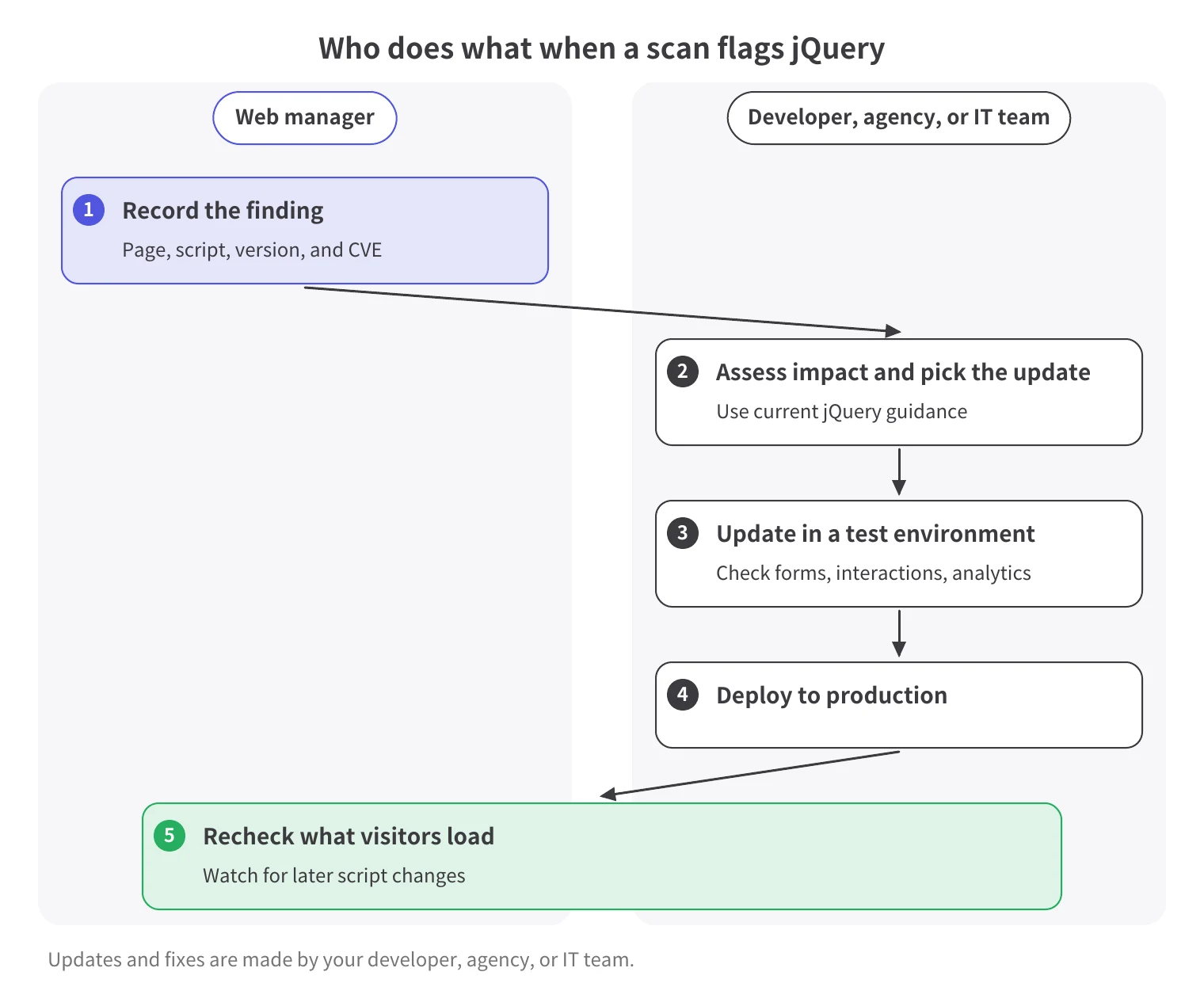
Start by recording what your website loads. Then ask your developer, web agency, or IT team to confirm the finding and plan the update. You don't need to touch the code yourself; your job is to coordinate the checks, testing, and follow-up for these jQuery vulnerabilities.
Both vulnerabilities can allow untrusted code to run when affected jQuery methods process untrusted HTML. Their version ranges and trigger conditions differ.
For example, jQuery 1.12.4, 2.2.4, and 3.4.1 fall inside both ranges, while 3.5.0 and later don't. The first fixed version only tells you when the fixes arrived. It doesn't tell you which version is right for your site today.
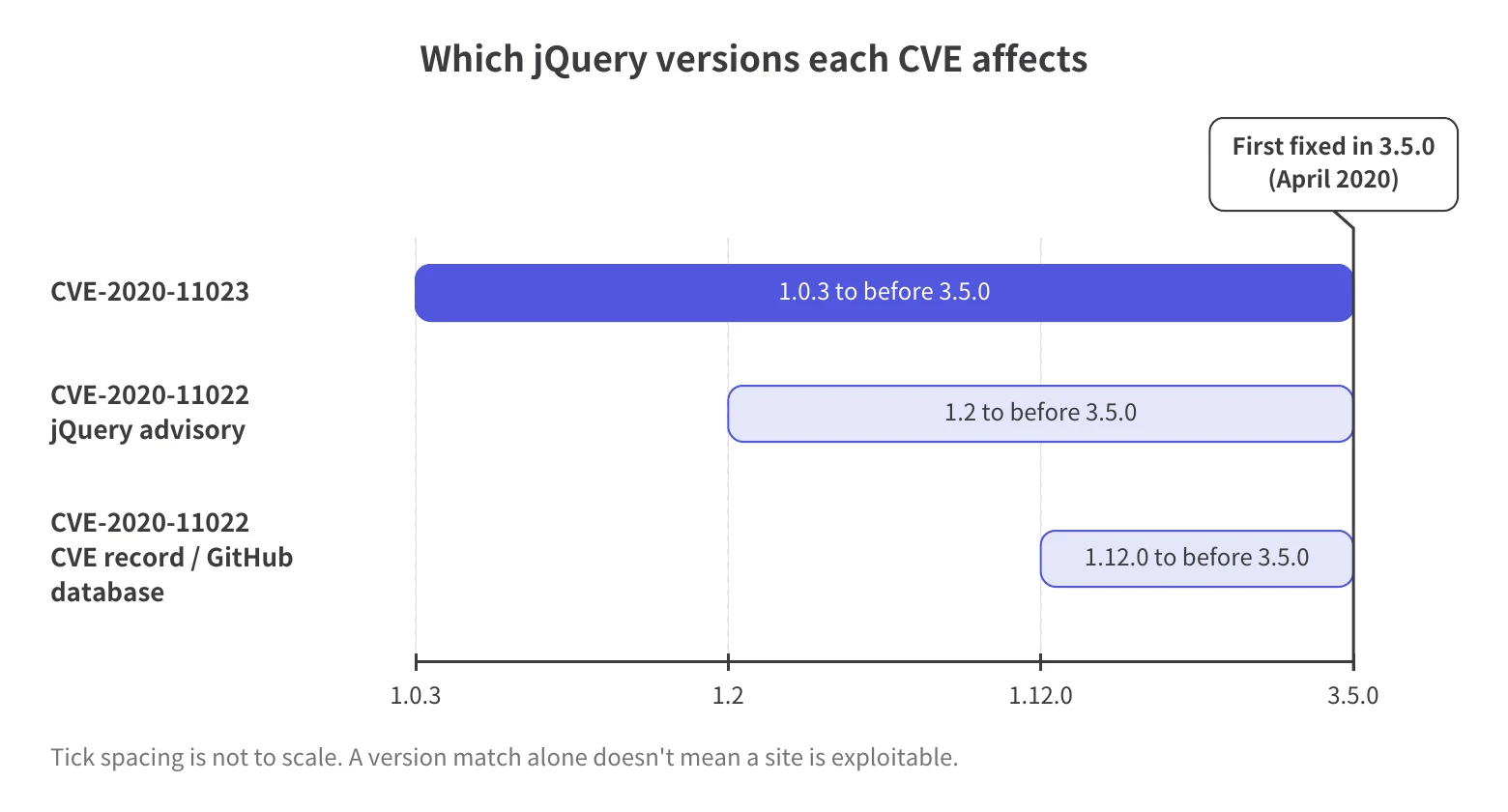
CVE-2020-11023 affects jQuery 1.0.3 up to, but not including, 3.5.0. What distinguishes it is that the untrusted HTML contains <option> elements. The issue can occur even if the HTML was sanitized first (cleaned to remove unsafe content).
CISA added CVE-2020-11023 to its Known Exploited Vulnerabilities catalog on January 23, 2025. Ask your developer how urgent the fix is. CVE-2020-11022 wasn't in the catalog when we checked on October 26, 2026; that alone doesn't tell us whether it has been exploited.
For CVE-2020-11022, the CVE record, the GitHub Advisory Database, and Retire.js list 1.12.0 as the earliest affected version. jQuery's advisory lists 1.2.
When you forward the finding, say which source each version range comes from. Ask your developer which record the scan uses and how it applies to the detected file.
No. A version check doesn't show whether your site passes untrusted HTML to the affected methods or whether an attack occurred. Your developer needs to investigate the code involved.
For broader context, see how third-party scripts create website security risks.
Check the version loaded on the reported page, then inspect the script files. Record the page URL, script URL, and detected version so your developer can investigate the same finding.
Open your browser's developer console on the reported page and enter jQuery.fn.jquery. If the page exposes jQuery under the global name jQuery, the console returns its version string.
A missing result doesn't prove that jQuery is absent. Save whatever the console shows, including an error, and pass it to your developer.
Your developer should inspect the JavaScript files the page loads. Check filenames, URLs, and any version comment near the beginning of the file.
Official jQuery distribution files include a version comment. Record the file URL alongside the version you find.
Record every copy your developer identifies, the pages loading it, and each reported CVE. A single console result isn't a complete inventory. If your site uses Google Tag Manager (GTM), include scripts loaded through GTM in your review.
SiteScan inventories JavaScript, third-party tools, and tags loaded in the browser. It compares identified library versions with known vulnerability information. This gives your developer a starting point, but it can't tell you whether your site is exploitable or compromised.
Pages behind a login, or pages that aren't public, can be included only if the SiteScan tag is installed through GTM.
Your developer should choose an update, test it in a test environment, and deploy it after compatibility checks. jQuery 3.5.0 is the first release that fixes these two CVEs, but it isn't necessarily the version to update to. Versions from 3.5.0 onward aren't affected by these two CVEs. The 1.x and 2.x branches are no longer supported, so sites still on them need to move to a newer branch.
Send the reported CVEs, page URLs, script URLs, and detected versions. Agree on who does what before work begins.
The jQuery support policy says only the latest version is supported. The 3.x branch receives only critical security patches and bug fixes. The policy encourages users to upgrade to the latest jQuery 4.x release.
Before deploying, the team should review current releases and compatibility requirements and test the chosen update.
Make sure every recorded copy is covered and the pages that need testing are listed.
Updates can affect code that depends on older jQuery behavior. The first fixed release, 3.5.0, changed HTML processing.
Ask your developer to test forms, page interactions, and analytics. jQuery Migrate can help identify compatibility issues. Its development build logs warnings about removed or deprecated APIs. The team should use a compatible Migrate version.
For the bigger picture, see JavaScript security practices for website owners.
Once testing is done, your developer or maintenance team deploys the update. Ask for the deployed version and test results, then recheck the files and functions on the live pages.
Ask your developer to assess temporary measures based on the specific CVE and your site's code. Older workaround instructions need review before anyone applies them to your current site. Ask which CVE a proposed workaround addresses and what remains unresolved.
The jQuery.htmlPrefilter function preprocesses HTML strings before jQuery inserts them. The CVE-2020-11022 advisory describes one workaround: replacing this function with one that returns its input unchanged. That workaround requires jQuery 1.12/2.2 or newer.
It isn't the same as restoring the older HTML-rewriting behavior. The jQuery 3.5 upgrade guide warns that redefining the prefilter to restore that behavior undoes the security fix. Don't request that change as a security measure.
The workaround text in the CVE-2020-11023 advisory mentions the SAFE_FOR_JQUERY setting in DOMPurify, a library that cleans untrusted HTML. DOMPurify's documentation lists that setting as removed in version 2.1.0.
Don't put that setting in a fix request as a current option. Ask your developer to check the current documentation and follow the agreed jQuery update plan.
Recheck the versions visitors load after deployment, then continue reviewing script changes. A cleared warning doesn't mean the rest of your site is secure.
Go back to the recorded page URLs and confirm the loaded files and versions with your developer. Account for every identified copy, then check forms, page interactions, and analytics again.
Keep the results with the original finding so the team can see what changed and whether anything remains unresolved.
SiteScan keeps version history and continuously monitors script changes, which supports follow-up reviews. Your team still needs to record what each script does and who is responsible for it.
Its scope is browser-loaded scripts. It doesn't audit first-party or custom code, scan server-side code, block attacks, or automatically update or fix code.
For the ongoing process, see how to maintain a script inventory and monitor changes.
Your developer, web agency, or IT team handles updates and fixes.
When a scan flags your jQuery version, work with your developer to confirm the finding, plan an update, and test it. Detecting a version alone doesn't show whether your site can be exploited or has been compromised.
CVE-2020-11023 affects jQuery versions from 1.0.3 up to, but not including, 3.5.0. In affected versions, certain jQuery methods can run malicious JavaScript when they insert untrusted HTML containing option elements into a page, even after attempts to remove unsafe content. Finding an affected version alone doesn't prove that attackers can exploit the flaw on your site or have already compromised it.
If jQuery is exposed on the page, check jQuery.fn.jquery in your browser's developer console. You can also inspect the loaded script files and their version comments. Ask your developer to check for additional copies, because a single console result isn't a complete script inventory.
Not necessarily. Ask your developer to choose a version based on current jQuery guidance and your site's compatibility requirements. jQuery 3.5.0 was the first version to fix these two CVEs in April 2020. That doesn't make it the right upgrade for every site today or guarantee that your site is secure.
Yes, an update can affect code that depends on older jQuery behavior. The 3.5.0 release changed HTML processing, so your developer should test forms, page interactions, and analytics before deployment. jQuery Migrate can help identify compatibility issues. Separately, jQuery's upgrade guide warns that restoring the old HTML-prefilter behavior undoes the security fix.
SiteScan can show you which jQuery versions it identifies in the scripts your pages load in the browser. It compares them with known vulnerability information. It also keeps version history and monitors script changes. Pages behind a login or pages that aren't public need the SiteScan tag installed through Google Tag Manager. Your developer, web agency, or IT team handles updates and fixes.

Crecimiento de MFA, riesgos de fraude impulsados por IA y cómo los principales anunciantes protegen sus presupuestos. PDF gratuito.