Ad verification typically checks whether ad delivery meets specified requirements, while ad fraud detection looks for signs of fraudulent activity in ad traffic. Their scope can overlap when verification includes invalid traffic checks. You may need both types of checks, but that does not necessarily mean you need separate tools.
If your reports show viewability but say little about click quality, start by reviewing what they measure. A service's name won't tell you which questions its reports answer or whether any action follows a finding.
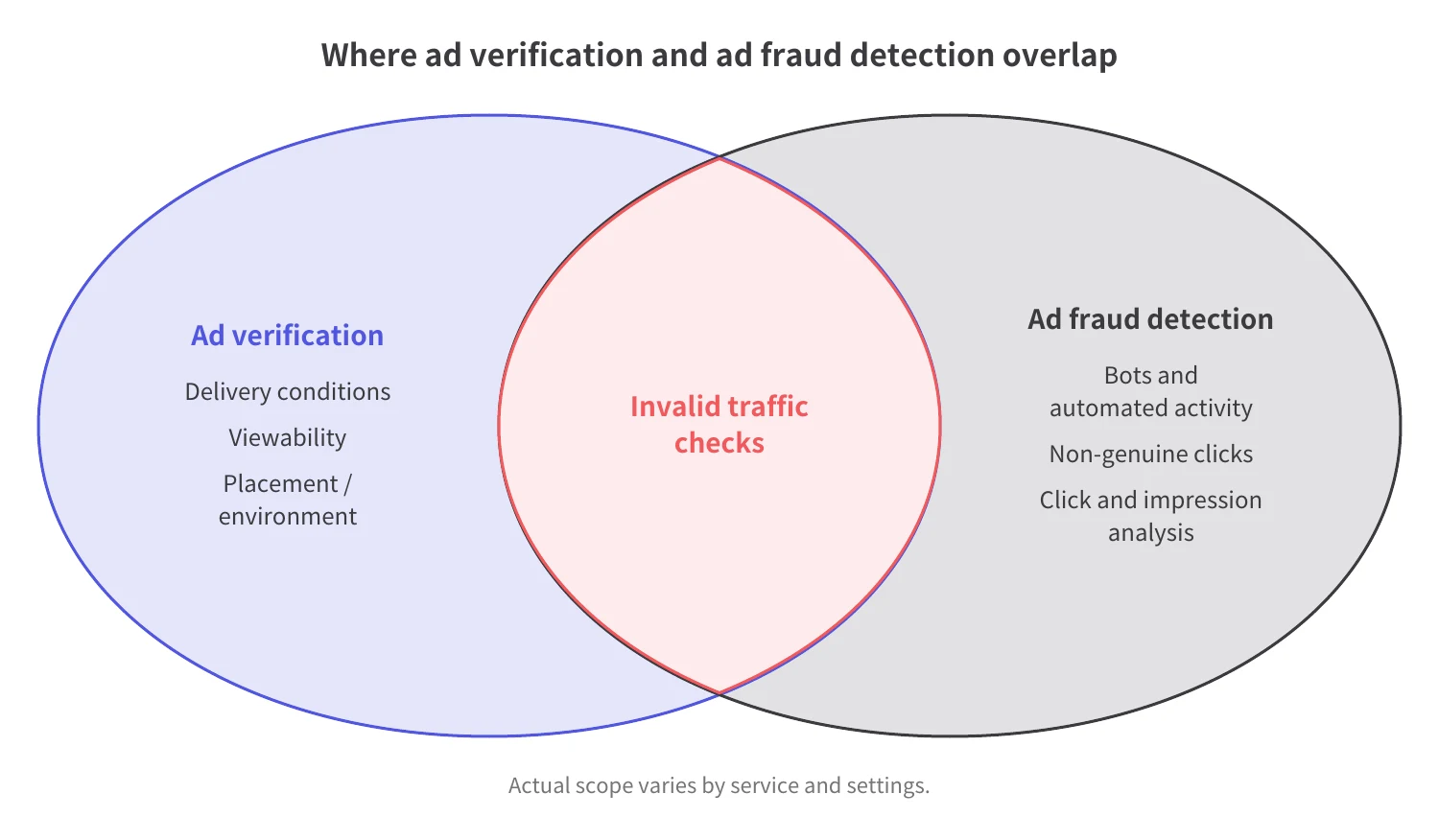
The main difference is scope. Ad verification typically asks a broad question: did delivery meet the specified requirements? Ad fraud detection asks a narrower one: does the ad traffic show signs of fraudulent activity?
Ad verification typically checks whether ads were delivered under agreed conditions. Depending on the service and its settings, checks can include whether an ad was viewable, where it appeared, and whether the traffic was invalid.
These checks cover different parts of delivery: a viewability result shows whether the ad had a chance to be seen, and a placement check shows the environment where it appeared.
The label "ad verification" won't tell you which checks your service performs. To read a report correctly, you need to know which requirements were assessed and which measurements support the result.
Ad fraud detection analyzes clicks and impressions for signs of fraudulent activity. Those signs may involve bots, automated activity, or other non-genuine interactions.
It focuses on the activity behind your ad traffic. For example, you may want to know whether recorded clicks show signs of automation. That's a different question from whether an ad appeared in the agreed environment.
Detection flags activity that may be fraudulent. Blocking or exclusion is a separate action that may follow it. So a service's detection capability doesn't, by itself, tell you whether it also applies exclusions.
They overlap when both include checks on whether ad traffic is valid. That shared function doesn't mean they cover the same platforms, measure the same events, or take the same actions. When a service lists "invalid traffic detection" as a feature, check what it covers and how it overlaps with your verification and fraud detection checks.
Compare what each report covers. A check on impressions doesn't mean clicks were checked too. Coverage on one ad platform doesn't carry over to another.
Then look at the response. Does the service report a finding, apply an exclusion, or support both? Only the reports and settings can answer that, not the product category name.
No. Invalid traffic includes non-malicious activity, so the two terms aren't interchangeable.
Google Ads describes invalid traffic as traffic that doesn't represent genuine interest in your business. Its examples include automated clicks and impressions, accidental clicks, and intentional interactions from people with no genuine interest in the ad.
Google AdSense also notes that invalid traffic "covers intentionally fraudulent traffic as well as accidental clicks." That distinction matters when you explain a report to your team.
An invalid traffic finding isn't proof of deliberate fraud. Describe what was classified as invalid, and don't assign malicious intent based on that label alone.
For the detailed GIVT/SIVT classification, see our guide to types of invalid traffic and prevention.
Reports tell you which checks were performed and what they found. To understand what a result shows, separate the measurement from any action taken afterward.
No. A viewable impression means the ad had an opportunity to be seen. It doesn't tell you whether a click was genuine.
Google's Active View guidance notes that Active View "can tell you when ads are viewable, but it can't guarantee that a user is looking at the screen at that time." That limit is about attention. Click validity is a separate question, and a viewability result doesn't answer it.
When you review a viewability report, check whether invalid traffic checks are included. Then confirm whether those checks cover impressions, clicks, or both.
If the report only describes viewability, click validity is still an open question. If it also reports invalid traffic, confirm what was measured before assuming the result applies to clicks.
No. Detecting activity and blocking or excluding it are separate functions. A report of detected fraud doesn't show that anything was stopped.
Look for evidence of what action was taken, where it was applied, and when it took effect. For example, an exclusion record should name the platform or campaign and show whether the exclusion is active.
When you review results, read the detection record and the action record separately. A finding tells you that traffic was flagged. An action record tells you whether an exclusion was applied.
If you can't find the action details, treat blocking as unconfirmed. Also check whether the function was turned on for the campaigns and the period the report covers.
Start by identifying which questions your current setup leaves unanswered. Those are the checks you still need. You may need both delivery verification and fraud detection, but one service could provide both.
Start with your current contract and active settings. Identify the platforms covered, whether the service measures impressions or clicks, and which checks are included. Review blocking or exclusion separately from detection.
A capability listed in a contract doesn't tell you whether it's turned on in your setup. If coverage or settings are unclear, mark the check as unconfirmed until you know whether it's active and what it covers.
Use the table to identify what you still need to check:
Let the missing check drive your next step. If your current service already performs it, confirm the settings and reporting. If it doesn't, you've found the gap to address.
Our guide to choosing an ad fraud detection tool walks through the selection criteria. For approaches focused on bots, see types of bot detection tools for advertisers. You can also read about whether Google's click fraud protection is enough.
Spider AF, provided by Spider Labs, detects fraudulent clicks and invalid traffic in web advertising, and paid plans add automatic blocking.
Spider AF PPC Protection detects invalid clicks in real time and pushes IP and audience exclusions back to Google, Meta, and other major ad platforms.
These capabilities cover traffic detection and exclusion. When you read your Spider AF results, check both: which clicks were flagged, and which exclusions were applied to your ad accounts.
The Spider AF free trial measures invalid traffic across Search, Performance Max, Display, and Social campaigns. It doesn't block traffic during the trial; blocking comes with a paid plan.
The trial shows you what invalid traffic is being identified in your own accounts. Read those findings as measurement results, not as a record of blocked traffic.
Ad verification typically checks whether ad delivery met the specified requirements, such as viewability and placement, while ad fraud detection looks for signs of fraud. They overlap when verification includes invalid traffic checks.
No, viewability by itself can't tell you whether a click was genuine. Check whether your verification service includes invalid traffic checks and which clicks they cover.
Not necessarily. Detection and blocking are separate functions, so detecting invalid traffic doesn't mean it was blocked. Check whether blocking is available and turned on for the campaigns you want to protect.
You may need both kinds of checks, but not necessarily two separate tools. Start with the gaps in your current setup, and review your current service's scope before adding another tool.
No, invalid traffic also includes non-malicious activity, such as accidental clicks. Don't treat an invalid traffic finding as proof of deliberate fraud.

Crecimiento de MFA, riesgos de fraude impulsados por IA y cómo los principales anunciantes protegen sus presupuestos. PDF gratuito.



.png)