LinkedIn's Ad Library lets you peek inside your competitors' playbook — their messaging, offers, and creative across every market they target. But most marketers don't know where to start, or where the tool falls short. Here's how to get real intel from it, fast.
Last updated: June 2026
The LinkedIn Ads Library is a free, publicly searchable database of every active sponsored ad running on LinkedIn — no login required. Launched in June 2023 to meet EU Digital Services Act transparency requirements, it lets any marketer search by advertiser, keyword, country, and date range to see exactly what competitors are promoting right now.
LinkedIn commands 41% of B2B paid social budgets globally (eMarketer, 2025), making it the single largest paid channel for B2B marketers. Yet most teams build campaigns in isolation, without looking at what the rest of the market is doing. The LinkedIn ad library changes that — and this guide shows you the complete workflow.
The LinkedIn Ads Library (also called the LinkedIn ad library) is LinkedIn's platform-wide transparency tool for sponsored content. It is available globally to any visitor — not just EU-based users — and covers all active ads as well as ads that ran within the past year.
Key facts at a glance:
The library does not show budget, ad spend, CTR, conversion data, or exact targeting for non-EU ads. Think of it as a creative and messaging intelligence tool, not a media planning or bidding tool.
There are two routes to reach the LinkedIn Ads Library. Both work without a LinkedIn account.
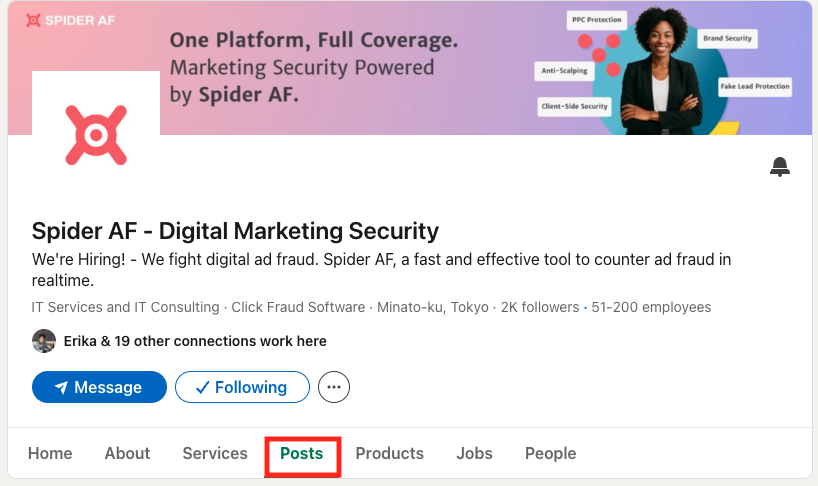
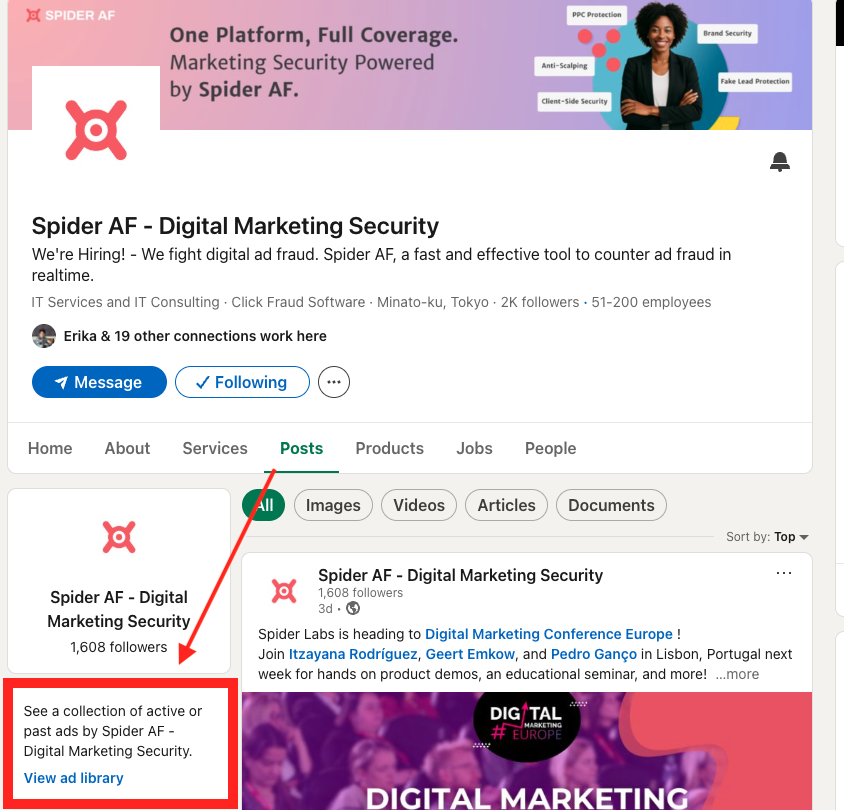
Once results appear, the filter panel on the left side narrows results by:
EU transparency bonus: For ads targeted to the European Economic Area, click any ad card to open its detail view. You will see an estimated impression range (e.g. 10,000–50,000 impressions), a country-level impression breakdown, and the top targeting parameters the advertiser selected — job function, seniority, industry, and geography. This data is required under the EU Digital Services Act (DSA) and is not available for non-EU-targeted ads.
Before building a research workflow, it pays to be precise about what the LinkedIn Ads Library does and does not expose. Many teams waste time looking for data that simply is not there.
The absence of performance data is manageable once you understand a reliable proxy: ad longevity. If a competitor has continuously run the same carousel for 90 days, the probability that it is performing is high. Advertisers do not sustain underperforming creative for three months on a platform where the average LinkedIn CPC runs $8–$15 in competitive B2B categories.

This workflow takes roughly 15 minutes once you have run it once, and around 20 minutes the first time. The output is a competitor messaging map you can use to brief creative teams and surface differentiation gaps your competitors have left open.
Choose three to five direct competitors and one adjacent company with noticeably active creative. Keep the list tight — depth on five companies beats skimming fifteen.
If you are unsure who to include, run a keyword search in the LinkedIn Ads Library using a core category term (e.g. "marketing automation" or "B2B data enrichment"). Advertisers that appear across multiple keyword searches are the ones with the biggest active LinkedIn budgets — prioritise those.
A company running 15 active single-image ads is A/B-testing messages at scale. A company running one video ad in a single market is either tightly targeted or early in a campaign. Both tell you something strategically useful.
Without CTR or conversion data, the ad's offer type is the clearest signal of funnel intent. Use this mapping:
If all competitors are pushing BOFU offers, there is likely a gap at the top of the funnel — awareness content may outperform in your category. If everyone runs TOFU, you may get better ROI pushing prospects directly to a demo.
For each ad, copy the headline and first line of body copy into a shared spreadsheet or document. Across the full set, look for:
Patterns appearing across multiple competitors reflect validated category language. Angles that are absent from the pattern are your differentiation opportunity.
Summarise your session into three documents you can share with the creative team immediately:

The LinkedIn Ads Library gives you raw material — dozens of ad headlines, body copy snippets, and CTAs spread across multiple competitors. The challenge is turning that volume of text into a coherent picture of the competitive landscape fast. AI tools accelerate this process significantly.
The workflow below takes the output of Step 4 above (your collected ad copy) and puts it through a structured AI analysis session. It works with any large-context AI assistant — ChatGPT (GPT-4o), Claude, or Gemini.
From your competitor research session, copy the headline and first two lines of body copy from at least ten ads across your shortlisted competitors. Paste these into a single document — or directly into an AI chat session. Keep the advertiser name attached to each entry so the model can separate results by company.
Aim for at least two ads per competitor. More is better, up to around thirty ads before returns diminish.
Paste your collected ad copy into the AI and use a prompt in this format:
The output of this prompt is your category language map — a structured view of what the entire competitive set is saying. This is the foundation for differentiation.
Once you have the pattern analysis, run a second prompt to generate test hypotheses from the gaps the AI identified:
AI-generated copy is a starting point, not a validated answer. Before pushing a new message to live campaigns, run a quick relevance check against your historical LinkedIn data:
Be precise about the limits. AI can identify patterns in the copy you feed it, generate variations, and rank hypotheses by differentiation. It cannot tell you which competitor ads are actually performing (because the library does not contain that data), and it cannot guarantee that a gap-based angle will convert for your audience. Use AI output as hypothesis input to a proper A/B test — not as a replacement for one.
Beyond the standard competitor lookup, these four tactics surface intelligence most teams miss.
Instead of searching by advertiser name, search by a keyword — for example, "demand generation" or "pipeline efficiency". This returns every active ad using that term in copy, across all advertisers. You quickly see which companies are occupying the same language territory as you, and how they frame it. Advertisers that appear consistently for multiple pain-point terms are your primary messaging competitors, regardless of whether they are direct product competitors.
Add a recurring calendar reminder (monthly, 15 minutes) to check the last 30 days of ads for your top five competitors. A sudden increase in the number of active ads from one company often signals a new product launch, rebranding, or a quarterly push — giving you early warning to adjust your own messaging before the campaign fully saturates the market.
If your competitors target European markets, the DSA transparency layer gives you their top targeting parameters: job function, seniority level, industry, and geography. Even if your own campaigns target the US or APAC, EU-based targeting data from the same competitor reveals their core ICP (ideal customer profile) assumptions — information that transfers across geos.
If every competitor in your category runs single-image ads, document ads (native lead gen downloads) may have lower competition for impression share at equivalent spend. LinkedIn's 2025 data shows video ad volume grew 30% year-over-year — in image-heavy categories, early movers on video often enjoy lower CPMs while the format remains novel in that vertical.
Competitive research through the LinkedIn Ads Library is outbound intelligence — you study what others do. But while you look outward, invalid traffic (IVT) may quietly be corrupting your own campaign results inward.
LinkedIn's invalid traffic problem has grown sharply. According to tracking data from multiple measurement sources, LinkedIn's IVT rate reached 17.62% in Q1 2026 — meaning roughly $1,760 of every $10,000 spent on LinkedIn goes to impressions and clicks that will never convert to real pipeline. Bot accounts on LinkedIn have grown from 21.5 million in H1 2019 to an estimated 83.4 million in H1 2025, increasing at roughly 50% annually over the past three years.
LinkedIn partnered with HUMAN Security in June 2024 to strengthen platform-level IVT protection, but the IVT rate continued rising quarter on quarter through Q1 2026. Platform protection alone is not sufficient. Two categories of fraud are especially common on LinkedIn ad campaigns:
Click fraud — invalid clicks generated by bots, click farms, or automated tools — inflates click counts and depletes daily budgets before real prospects see your ads. On LinkedIn, where CPCs typically range from $8 to $15 in competitive B2B categories, even a modest volume of fraudulent clicks can exhaust a campaign budget in hours. Spider AF's 2025 campaign data shows an average 5.1% invalid-click rate across measured LinkedIn campaigns, with outlier networks peaking at 46.9%.
For a full breakdown of how click fraud works and how to detect it on LinkedIn, see: Fake Leads Are Draining Your LinkedIn Ads: Here's How to Stop Them.
LinkedIn Lead Gen Forms pre-fill contact details from a member's profile, which makes them high-converting — but also a target for abuse. Bots exploit the form automation to submit plausible-looking but entirely invalid contacts, filling CRMs with junk data that distorts lead quality reporting, wastes sales team time, and inflates the apparent CPL on otherwise healthy campaigns. Spider AF recorded one advertiser receiving 400 fraudulent leads in two months through LinkedIn Lead Gen Forms alone.
Unlike click fraud, fake leads are harder to spot in real time because the submission looks legitimate at the point of entry. Post-conversion validation — checking lead quality signals after submission — is the most reliable defence.
For more on the types of invalid traffic that affect B2B campaigns on paid social: A Complete Guide to Invalid Traffic (IVT).
The LinkedIn Ads Library is powerful for what it does — and transparent about what it does not do. These are the most common limitations and how experienced teams compensate for each.
Yes. The LinkedIn Ads Library is completely free and requires no LinkedIn account or login. Anyone can visit linkedin.com/ad-library/home and search all active sponsored content on the platform.
Go to linkedin.com/ad-library/home and search your competitor's company name. Set Country to your primary market and Date Range to last 90 days. Review active ads for messaging angle, offer type (TOFU/MOFU/BOFU), and creative format. Save ads that have been running 60+ days — longevity is a reliable proxy for performance since advertisers do not sustain underperforming creative. Repeat monthly for each competitor on your shortlist.
No. The LinkedIn Ads Library does not show budget, spend, CTR, or conversion data for any advertiser. For ads served in the EU, it shows an estimated impression range (e.g. 10,000–50,000), but outside the EU no performance or financial data is available.
Due to the EU Digital Services Act (DSA), ads targeted to the European Economic Area show additional transparency data: estimated impression ranges, top targeting parameters (job function, seniority, industry, geography), and the advertiser's legal identity. Ads targeted outside the EU show only the creative, advertiser name, ad format, and the region where the ad ran.
Ads remain searchable in the LinkedIn Ads Library for one year after their last impression. The library only covers ads that ran from June 1, 2023 onward, so the searchable historical window grows over time as the platform matures.
The LinkedIn Ads Library is a free, no-login-required window into every active sponsored campaign on the world's leading B2B advertising platform. With LinkedIn commanding 41% of B2B paid social budgets and a platform IVT rate now at 17.62% in Q1 2026, the intelligence available here is directly material to both your creative strategy and your budget efficiency.
The teams that extract the most value from the LinkedIn ad library follow three principles:
For more on protecting your paid campaigns from invalid traffic, explore Spider AF's PPC Protection and Fake Lead Protection products.
Last updated: June 2026 | Sources: eMarketer B2B Digital Ad Spend Forecast 2025; Spider Labs 2025 Ad Fraud Report; LinkedIn Help: Ad Library; LinkedIn Help: Ad Library DSA Targeting Parameters and Impressions; PPC Land: LinkedIn IVT Rate Report Q1 2026

MFA growth, AI-driven fraud risks, and how top advertisers are protecting their budgets. Free PDF!


.png)