You're switching between client accounts while CPA climbs — and you need a way to confirm each advertiser is protected.
Click fraud protection for agencies should let you work from one login while keeping each client's data separate, with the right permissions and rules and reports you can configure per client. Ask how exclusions work across your clients' ad networks. Seeing many campaigns on one screen doesn't mean you can manage each advertiser on its own.
Spider AF is a candidate to evaluate: a published agency case study describes multi-client management and reporting. Current availability, pricing and contract terms, and per-client permissions haven't been confirmed. Apply the same evidence standard to every candidate, then test with one client before expanding.
Pick click fraud tools for agencies that keep advertisers separate and offer user permissions, controls, and reporting that fit your workflow. Before you narrow your list, test how a tool behaves across the accounts and campaign types you actually manage.
Ask for a demo with two separate advertisers. Check which clients each user can see, which settings they can change, and what appears in exports.
One login should make your work easier without blurring the lines between clients. Document the required boundaries between client accounts before you test.
Test a rule change for one client and confirm it applies only to that client. Then trace an exclusion from detection through the connected ad account.
Agency evaluation checklist
Treat white labeling as its own requirement. Ask which branding elements you can change, and ask to see a finished sample. Ask whether pricing is per client, per site, or based on tracked click volume, and what happens to your invoice when a client leaves.
Record each result as confirmed, unsupported, or unresolved. A feature name alone isn't enough evidence to mark a requirement confirmed. Include the tested plan, account, and user role so another teammate can reproduce the check.
For general buying criteria that apply to any advertiser, see our overview of click fraud protection software. Comparing detection technologies? See bot detection tools for advertisers.
Each additional client adds permissions, settings, investigations, and reporting obligations. You also have to check suspicious traffic and explain what it means for each advertiser.
Google describes manager accounts as tools for agencies managing multiple client accounts. That structure doesn't tell you how a third-party protection tool connects.
Ask who has to approve the connection and whether it runs through the manager account or each client account. Write down who can revoke access.
Google's help center covers shared negative keyword lists in manager accounts. It doesn't say whether IP exclusion lists can be shared.
Treat viewing a signal, receiving an exclusion suggestion, and applying it as three separate steps.
Ask who reviews suggestions and how exceptions work for each client. Consider legitimate visitors sharing an IP address before approving exclusions across advertisers.
Name an owner for each decision. A shared signal should still have a documented reason for applying it to a particular client.
Check bids, targeting, creative, conversion tracking, and comparison periods alongside traffic quality. A CPA increase alone doesn't mean click fraud.
Log what else changed so your client can see which explanations are still on the table. If you're an advertiser evaluating your agency, start with these ad fraud risks and media budget checks.
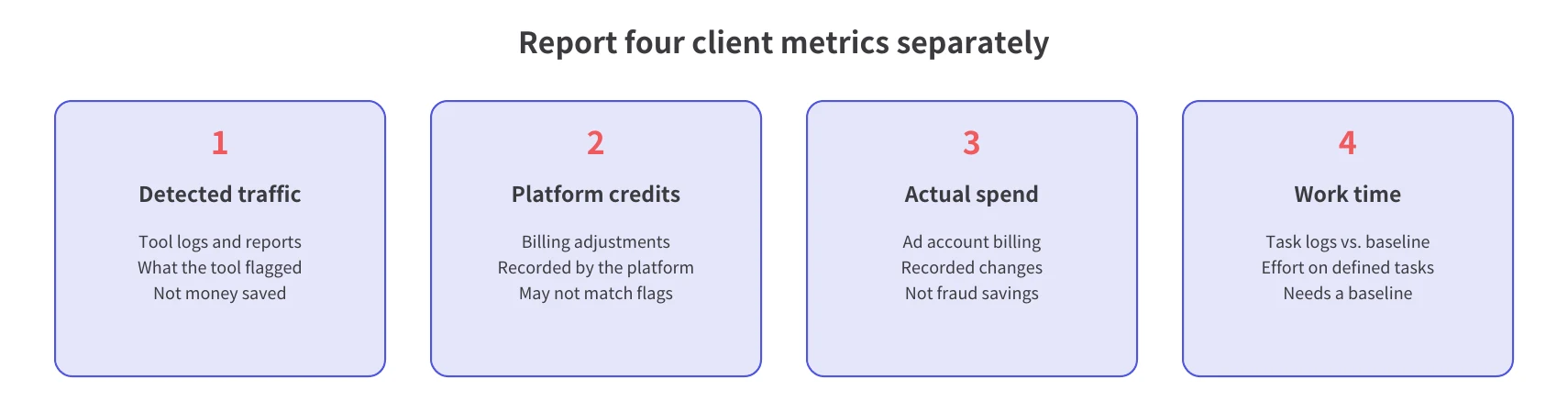
Google filters some invalid traffic before billing and credits some of what it finds later, while a third-party tool reports what it flagged. A third-party detection doesn't establish whether a click was billed, so check each client's platform, campaign type, exclusion settings, and billing records one by one.
Google says you aren't charged for invalid traffic it detects before billing. Invalid traffic found after billing is credited back through billing adjustments. Google's invalid traffic guidance also notes that third-party tools may flag traffic Google already kept off your bill.
Keep those records apart when you explain a client's results. A flagged click doesn't mean you were billed for it, and no tool can guarantee platform credits.
For broader context, see whether Google's click fraud protection is enough.
Google allows up to 500 IP exclusions per campaign. For Performance Max, IP exclusions work at the account level, not the campaign level. Check Google's IP exclusion documentation for the exact setting, and don't assume the campaign limit applies at the account level.
Google's Invalid Activity Credit Report covers Search and Performance Max campaigns. Confirm that scope before you promise a client a particular billing report.
Google's limits are documented, so start there. For Meta and Microsoft Advertising, check each platform's official help for current controls and limitations. Then test the candidate tool's integration and exclusion behavior on its own. A feature on the platform side doesn't mean a given tool can use it.
Keep a coverage record for each client: platform, account, campaign type, exclusion method, and verification date. Mark unsupported or unresolved combinations explicitly so your team doesn't assume uniform coverage.
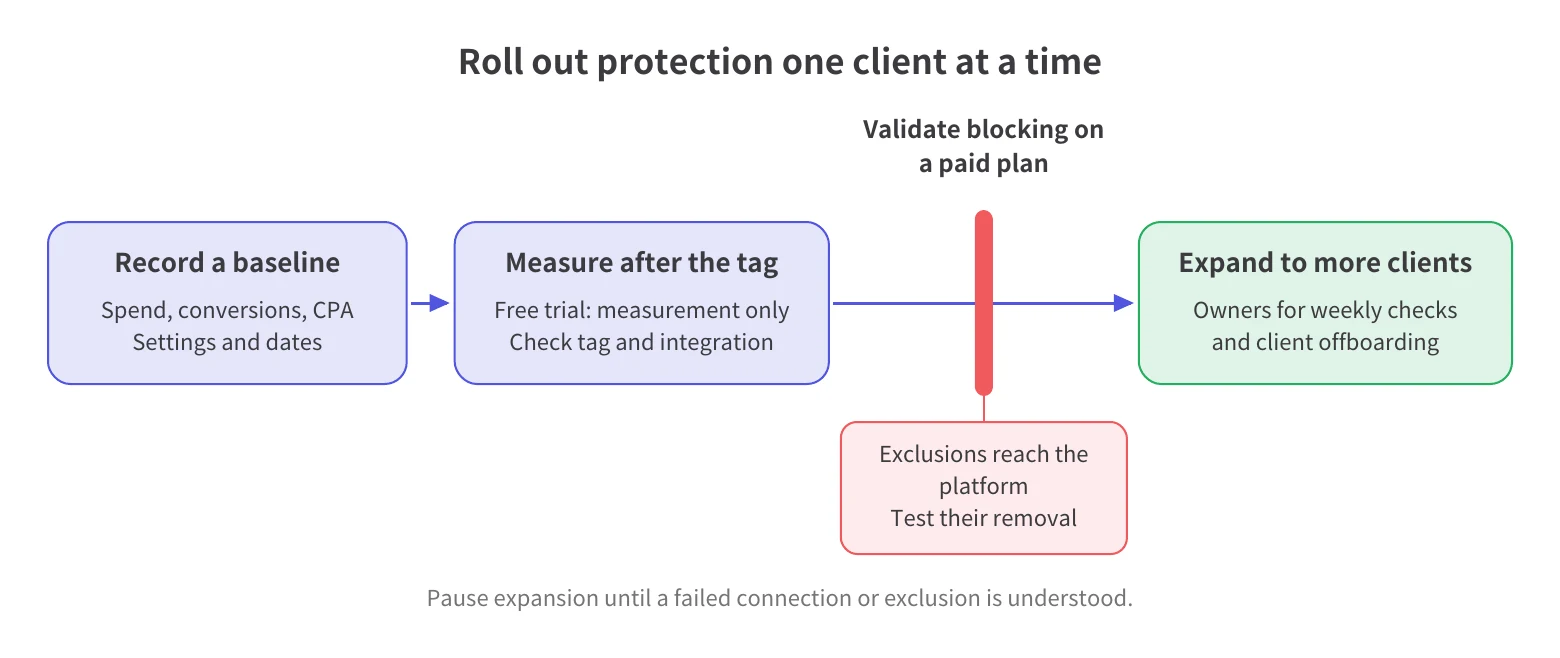
Start with one client, record a baseline, and check measurement and reporting before you add more. Spider AF's trial measures traffic after tag installation, and blocking is available on paid plans.
Pick a client that lets you install the tag and whose site gets enough traffic to test your workflow. Confirm authorization for any connection involving your manager account.
Record spend, conversions, CPA, campaign settings, and comparison dates. Log bidding, targeting, creative, and measurement changes during the pilot.
Define the checks that must pass before you roll out protection to another client:
If a connection or exclusion fails, assign an owner to inspect permissions, account scope, and integration status. Pause expansion until the failure is understood.
Treat these as your pass/fail criteria. A vendor's promised improvement percentage isn't proof the setup works.
Give the weekly integration check to whoever handles ad ops, and the monthly review to the account lead.
Before a client leaves, agree who disconnects integrations, removes access, reviews existing exclusions, and retains exported reports. Write down what goes back to the client and who signs off.
Report detected traffic, platform credits, actual ad spend, and work time as four distinct numbers. Explain what each record supports, what remains uncertain, and what your team will investigate next.
Use matching reporting periods and identify the source of each metric. Don't report money saved or wasted by multiplying flagged clicks by average CPC. That math can't tell you whether those clicks were billed or already filtered.
Spider AF's published help says reports are kept for two months. Assign someone to save CSV exports monthly, before records fall outside that window.
Label files with the client, account, reporting period, and export date. Store them where the account team can retrieve them.
Start with what you saw — detections changed, credits appeared, spend moved, review time dropped — before you draw conclusions. Then say which explanation still needs more data, and name the next check and its owner.
What each client metric can tell you
Report credits exactly as the platform recorded them, explain any budget or campaign changes that affect the spend comparison, and keep the task definition the same across periods when you track time.
Spider AF PPC Protection detects invalid clicks in real time and pushes IP and audience exclusions back to Google, Meta, and other major ad platforms. Before you decide whether this agency click fraud protection fits, check client permissions, white labeling, agency pricing, and reseller terms.
Spider AF's agency page says you can see invalid click volume, fraud categories, and campaign detection rates on one screen. It doesn't say whether that view spans separate advertisers.
Spider AF's agency page says the free diagnostic report shows invalid click rates and estimated losses, and that you can use it in proposals. CSV logs support recurring reviews. Make it clear that the loss figures are estimates.
In the OOm case study, published July 18, 2025, the agency said: "The Agency Dashboard has made managing multiple clients faster and easier." The case study says the Agency Dashboard streamlines multi-client account management and reporting.
OOm said it added accounts and set up integrations itself, and that it didn't need separate client approvals for those connections at the time. When the case study was published, it also asked for a way to delete accounts itself.
Those statements describe OOm's experience. They don't tell you what permissions, features, or trial behavior you would get today.
Ask for a demo that matches your client setup. Then check that one login covers every advertiser and network and that each client gets its own views, permissions, rules, and exports. Also check how pricing changes as clients join or leave.
Spider AF capabilities and requirements to verify
Judge the referral program separately from your software needs. Spider AF's agency page mentions reseller and referral models. Before you pitch anything to clients, ask for the current reseller terms, including who signs the contract and who handles billing.
To see how Spider AF presents its agency offering, visit its agency page. Interested in referrals? See the referral program.
Choose a tool after verifying client separation, access, reporting, and exclusions in the setup you intend to use.
Look for tools that keep clients separate, with permissions, reporting, and exclusions for each network. Spider AF is a candidate because its published agency case study describes multi-client management and reporting. Ask about current availability, commercial terms, supported networks, and client permissions before choosing.
Not automatically. Decide which exclusions apply to each client. If a tool offers shared signals, check how you review suggestions, change settings, and handle legitimate visitors sharing an IP address. Keep the reason for each client's exclusions documented.
Spider AF's free trial won't show whether blocking works. It measures traffic after tag installation without blocking it. You can evaluate detection and available reporting during that period. Validate exclusion behavior through a paid pilot before expanding protection to other clients.
Show changes in bids, targeting, creative, measurement, and comparison periods, alongside your traffic-quality findings. Report detections, platform credits, actual ad spend, and work time separately. Explain what the evidence supports, and avoid attributing CPA changes to fraud without sufficient evidence.
Yes — you can use the free diagnostic report in proposals, and CSV logs support recurring reviews. Its published help says reports are kept for two months. Check client-specific report scope, branding options, and any reseller terms. Promise clients only what you've confirmed.

MFA growth, AI-driven fraud risks, and how top advertisers are protecting their budgets. Free PDF!



.png)