Your click fraud report might be flagging visits from real prospects—and if your protection tool acts on those flags, it can block real customers. A false positive is a real visitor’s click or visit that gets incorrectly classified as invalid.
That risk is worth checking before you turn on blocking. A single shared connection or a very short recorded visit isn’t enough to judge someone’s intent. Check the evidence behind a detection, the action it triggers, and your leads and sales. Use the five checks below to assess whether you’re ready to enable blocking.
Yes. Click fraud protection can block real customers if it acts on traffic it has misjudged. That’s why you should look at two things: how a tool flags traffic, and what it does next.
In click fraud protection, a false positive is legitimate traffic that a tool incorrectly classifies as invalid. The Google Ads Help pages we cite don’t use that term; they describe invalid clicks instead.
In Google Ads, an invalid click is one that doesn’t reflect genuine interest in your business. Google’s examples include accidental clicks, automated traffic, and manual clicks that increase your ad costs or inflate publisher profits. So “invalid” doesn’t always mean fraud.
Flagging traffic is one decision. Acting on that flag is another: a tool might exclude certain audiences from your campaigns or block them from your site. Before you enable blocking, ask the vendor exactly where blocking applies—your ads, your site, or both.
Shared connections and measurement limits can make real traffic look suspicious. Google Ads Help gives two examples that show why one signal alone isn’t enough to prove traffic is invalid.
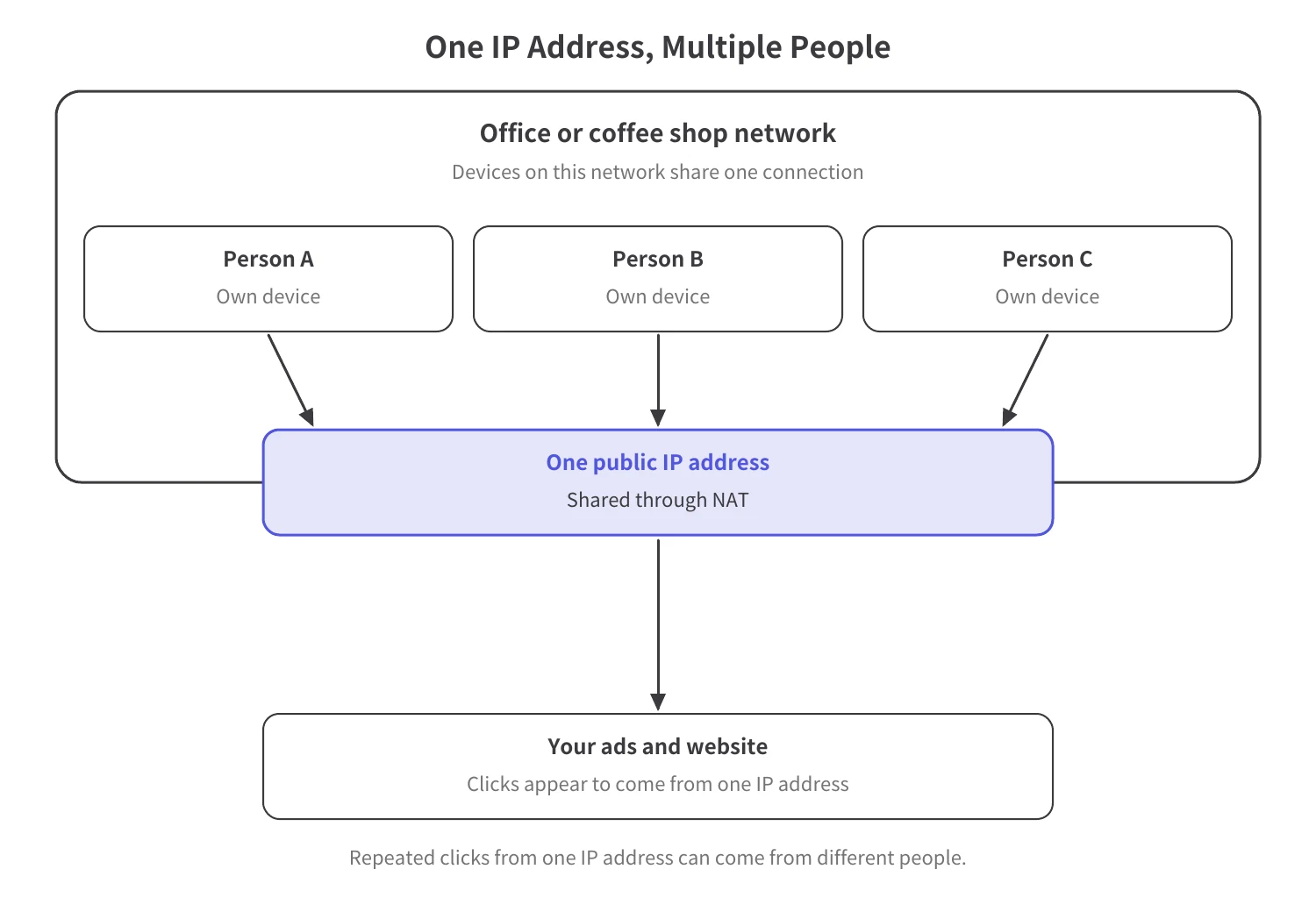
One public IP address (the number that identifies an internet connection) can represent many different people. Google explains that most networks, such as universities, offices, coffee shops, and mobile carriers, use Network Address Translation (NAT), which lets hundreds or thousands of devices share one public IP address.
So repeated clicks from one IP address—on office Wi-Fi or a mobile network, for example—can come from different people.
On its own, a visit recorded as zero seconds long doesn’t prove that a bot (a program that visits sites automatically) clicked your ad.
According to Google, “Many analytics tools require a second click to record visit duration.” Before you assume the visitor left right away, check how your analytics tool measures visit duration.
Signals That Need Context
Before you let click fraud software block traffic, run five checks: look at more than one signal, check lead and sales quality, confirm what gets blocked, assign a review owner, and record a baseline. These five checks are our own process, informed by Google Ads guidance.
Ask the vendor what evidence, besides an IP address, it uses to flag traffic. Also look at click patterns and browsing behavior. Useful context includes how often and how quickly the same source clicks, whether its location matches your targeting, and what the visitor did on your site. Check whether flagged traffic includes your own office network, your agency, partners, or existing customers. Multiple signals add context, but they don’t eliminate false positives.
Look at the quality of your conversions—your leads and sales—not just how many you get.
According to Google Ads Help, when a click that led to a conversion is later identified as invalid, Google removes the click from campaign metrics, but “the valid conversion remains.” A conversion doesn’t prove the click was valid, and an invalid click doesn’t necessarily mean the conversion was fake.
Ask what triggers a block. Does the tool exclude IP addresses or audiences from your campaigns, or does it block visitors from your site? Also ask whether you can adjust the settings or undo a block. Don’t assume those options exist. If the tool allows it, limit blocking to one campaign at first and expand only after comparing results with your baseline.
Pick one person on your team to collect the evidence and follow up whenever a flag looks wrong. Ask the vendor who reviews disputed detections, what explanations they can provide, and what options exist to correct a decision.
Record your starting numbers before any blocking begins. A baseline is a snapshot of your performance before a change, so you have something to compare against later. Include ad spend, campaign settings, and the number and quality of your conversions.
Start by measuring without blocking to see what gets flagged. A measurement-only period can’t show how blocking would affect leads or sales, and flagged-traffic counts alone don’t give you a false-positive rate.
Five Checks Before Blocking
To match the type of tool to your problem before you compare vendors, see how to choose a bot detection tool.
Look at your leads and sales, blocking counts, and campaign changes together. A drop after blocking starts is a reason to investigate, not proof that blocking caused it.
Compare the volume and quality of your conversions with your baseline. Check whether budgets, ad creative, or targeting changed, too. Before anyone blames blocking for a drop, have your review owner look at those campaign changes together with any disputed detections.
A blocked-click count doesn’t tell you how many of those blocks hit legitimate visitors. To estimate a false-positive rate, you need a way to verify which classifications were correct.
Count the verified legitimate visits that were incorrectly flagged, then divide that number by all the verified legitimate visits you evaluated—both those correctly classified as legitimate and those incorrectly flagged as invalid.
Google Ads filters the invalid clicks its systems detect out of campaign metrics and billing. As Google Ads Help explains, credits for invalid clicks identified after billing appear on your next invoice “where appropriate and possible.” The Invalid clicks column in your Google Ads account shows traffic that was already filtered out and not billed. Third-party tools may flag those same clicks, too, so look at your platform records before you count every flagged click as wasted spend.
Google also notes that an investigation “won't be able to confirm if specific clicks were marked as valid or invalid.”
For more context on Google Ads’ existing protections, see whether Google’s click fraud protection is enough.
During its two-week free trial, Spider AF shows which traffic it flags as invalid—without blocking anything—so you can run the measurement-only period from Check 5 before you decide on blocking. Because nothing is blocked, that measurement can’t show how blocking would affect your leads or sales.
Spider AF analyzes IP addresses, browsing patterns, and user agent data (details about the visitor’s browser and device) to detect invalid clicks and bot traffic.
Create an account and add the Spider AF Tag, a piece of measurement code, to your site. Adding the tag starts your two-week trial automatically, and you’ll receive your ad fraud results in 10 to 14 days. Connect your ad accounts as well.
Spider AF enables blocking only after you upgrade to a paid plan. On a paid plan, Spider AF PPC Protection can exclude IP addresses and audiences from your ad campaigns in real time; no exclusion rules are applied until you give the go-ahead. Trial measurements also don’t prove zero false positives.
For a broader checklist, see how to evaluate click fraud protection during a free trial.
Want to see what gets flagged in your own traffic first? Your two-week trial measures traffic without blocking anything.
False positives can cost you customers when mistaken classifications trigger blocking. Before you turn blocking on, check multiple traffic signals, look at lead and sales quality, and decide who reviews disputed detections. Once blocking is live, compare your results with your baseline—a blocked-click count alone won’t tell you whether it’s working or whether it’s costing you real customers.
Spider AF’s two-week trial shows what gets flagged in your traffic before anything is blocked. To get started, add the Spider AF Tag and connect your ad accounts. To turn on blocking with Spider AF, you’ll need a paid plan.
Yes, a tool can block a real customer if it misclassifies legitimate traffic as invalid. That mistaken classification is called a false positive.
No. Google explains that multiple devices can share a public IP address, so review other traffic signals and the quality of leads and sales before deciding to block.
No. Google notes that some analytics tools need a second click to calculate visit duration, so a zero-second visit alone does not prove invalid traffic.
Review multiple traffic signals, check the quality of leads and sales, and record a baseline before blocking starts. Ask what gets blocked, who reviews disputed detections, and what options exist to correct a decision. These checks help assess risk but do not establish a zero false-positive rate.
Spider AF shows what it flags as invalid traffic during its free trial, without blocking. Spider AF analyzes IP addresses, user agent data, and browsing patterns to detect invalid clicks and bot traffic. Spider AF starts your two-week trial when you add the Spider AF Tag; connect your ad accounts to measure traffic without blocking. Spider AF enables ad fraud blocking after you upgrade to a paid plan.

MFA growth, AI-driven fraud risks, and how top advertisers are protecting their budgets. Free PDF!