Your ChatGPT ad report shows clicks, but a count alone can’t tell you whether they came from real people. To check traffic quality, compare your campaign reports, recorded website activity, and leads or sales.
Each record answers a different question. A reported click isn’t the same as a recorded visit, and a visit without a purchase isn’t evidence of fraud.
The five checks below help you identify measurement problems, patterns that may point to click fraud or other invalid traffic, and unresolved billing questions. Start by comparing records that cover the same dates and the same campaigns.
A click count alone can’t show whether real people made the clicks, so check it against your site activity and the leads or sales that followed. OpenAI bills click campaigns per valid click, and what your analytics counts can differ from what OpenAI bills.
Click fraud is generally understood as the deliberate manipulation of ad clicks. An invalid click, under Google Ads’ definition, is a click that doesn’t represent genuine interest in your business. Google’s examples include accidental clicks, clicks that increase your ad costs or inflate publisher profits, and clicks from automated tools and bots (programs that access sites automatically). Invalid traffic (IVT) is the wider term for clicks and visits of this kind.
That definition comes from Google Ads, not from OpenAI’s billing rules. A low conversion rate is different again. Your conversion rate is the share of visits that produce a lead or sale, and a low rate is a weak result, not proof of fraud or invalid clicks.
Where an ad appeared and who clicked it are separate questions. An ad appearing in ChatGPT doesn’t tell you whether a person or software clicked it. AI agents (software that browses and acts on someone’s behalf) are a topic of their own; see how AI agents interact with ads.
No. A gap between ad clicks and site visits doesn’t prove click fraud on its own. Check the comparison period, counting rules, and tracking setup before treating a difference as evidence of fraud.
A gap can come from causes that have nothing to do with fraud: reports that cover different dates or time zones, reporting delays, tracking that is missing or counted twice, and ad-review crawler visits that analytics may count as paid traffic. For each source, write down what it counts and which dates it covers, so you compare the same things.
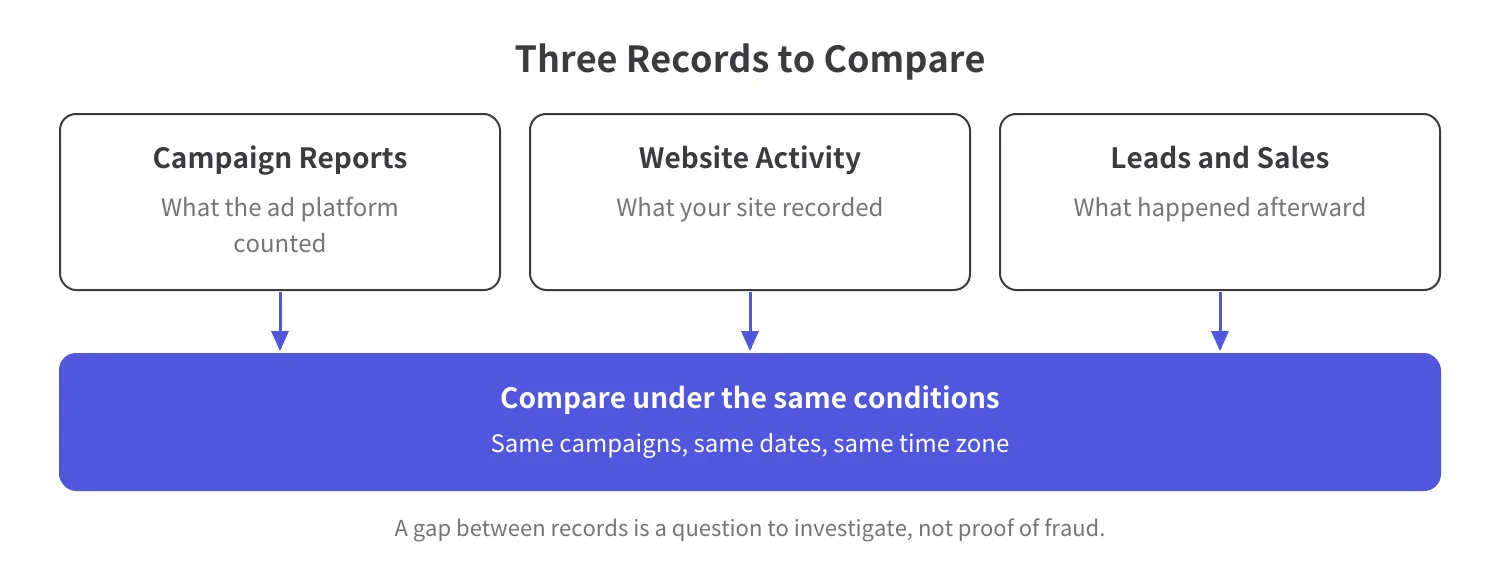
Table A: What Each Traffic Record Can Tell You
An IP address identifies an internet connection, not necessarily one person or device. Google’s invalid traffic guidance explains that several devices can share one IP address. It also notes that many analytics tools need a second click before they can record how long a visit lasted, so a visit that shows zero seconds doesn’t always mean the visitor left immediately.
Ask whether the same signal shows up with real leads and sales or only with visits that go nowhere. For background on automated visits, see what bot traffic is.
To check ChatGPT ads traffic quality, separate paid traffic, align dates and counting rules, compare clicks with site activity, review patterns and outcomes, and save your evidence. These checks help you investigate discrepancies. They don’t determine what OpenAI bills.
Analytics may group paid ChatGPT ad visits with other visits unless you label them. Add tracking parameters, which are labels attached to your landing-page URLs, so you can separate paid campaigns from organic (unpaid) visits. UTM parameters are one format for labeling sources and campaigns.
OpenAI’s Ads in ChatGPT: The Basics says static tracking parameters, such as UTM parameters, persist on ad clicks and can be used in existing analytics tools.
Reports that cover different dates or count different things won’t match, so start by matching dates, time zones, campaigns, and metric definitions. OpenAI’s Ads Manager Beta reporting currently includes impressions (the number of times your ad was shown), clicks, spend, and conversions (the leads, sales, or other outcomes you track). It also includes click-through rate (CTR, clicks as a share of impressions), average CPC (cost per click), and average CPM (cost per 1,000 impressions).
Impressions, clicks, and CTR refresh about every 15 minutes. Spend can lag by 7–8 hours, so a report that shows zero spend may still be missing charges. OpenAI notes that reporting times can vary.
OpenAI says self-serve threshold invoices show an approximate billing period in UTC (Coordinated Universal Time), and the first and last dates may include only part of a day. So when you compare an invoice with a report that covers whole calendar days, don’t expect the edges to line up.
A gap between clicks and visits can come from tracking rather than traffic, so line up reported clicks and recorded visits for the same campaigns and the same dates. If they differ, look first for pages where tracking is missing or counted twice. Also account for ad-review crawler visits, which third-party analytics may classify as paid traffic (see the section on OpenAI’s documents below). Fix any tracking problem you find, then compare again. The gap itself is not a count of invalid clicks.
One odd-looking signal can send you down the wrong path, so read repeated IP addresses and browsing patterns together with lead quality and purchases. Note which campaigns, dates, or landing pages the unusual patterns cluster around, and whether those visits also produced real leads or sales. One signal, or one sale, can’t tell you whether a click was valid.
Google’s definition of invalid clicks notes that in rare cases Google later identifies a click as invalid and filters it out while the valid conversion remains. In other words, a click and the conversion that followed can be judged separately. This is a Google example, not an OpenAI billing rule.
Save your reports, site records, comparison dates, campaign IDs, and notes on any discrepancies. Write down the open questions you want to send to OpenAI Support, and note which records relate to each one. OpenAI’s Advertising Terms require notice of a fee dispute within 30 days of the disputed activity, as explained below. For broader investigation guidance, see how to identify click fraud.
Table B: Five Checks for ChatGPT Ads Traffic Quality
Look in OpenAI’s documents for what they say about billable clicks, automated visits, and charge disputes, and ask OpenAI Support about anything they don’t cover. This section reflects OpenAI’s pages as read on November 20, 2026.
For campaigns with the Clicks (CPC) objective, OpenAI’s Creating campaigns for ChatGPT Ads says: “You pay per valid click.” Conversion-optimized campaigns that use click billing also charge for valid clicks, not conversions.
If you need to know how OpenAI decides that a click is valid, or what records it can review for your account, ask OpenAI Support.
Ad-review crawlers are automated programs that check submitted landing pages. OpenAI’s Ads in ChatGPT: The Basics page says they may visit your pages with tracking parameters attached, so third-party analytics tools may classify those visits as paid traffic.
Those crawler visits aren’t billable ad clicks and don’t incur click charges, so seeing one in your analytics as paid traffic isn’t a sign that you paid for it.
Under OpenAI’s Billing & Payment guidance, valid advertising spend that has already been delivered generally isn’t eligible for a refund. Getting fewer conversions, leads, or returns than you expected doesn’t change that by itself.
OpenAI’s Advertising Terms say fees based on metrics are determined by OpenAI’s measurements and/or data. To dispute a fee, you must notify OpenAI within 30 days of the disputed activity.
Adjustments are at OpenAI’s sole discretion and are made only as non-transferable compensation or credits. Under the terms, OpenAI doesn’t warrant that impressions, views, clicks, queries, or other interactions are human, valid, non-fraudulent, or free of invalid activity. Read the current terms for your account before relying on this summary.
If you have evidence that a technical issue, incorrect billing, or unauthorized activity affected your charges, contact OpenAI Support. The Billing & Payment page lists ads-support@openai.com as the address for billing questions. Refund eligibility depends on what the investigation finds and on the applicable policy, and you don’t need to identify the technical cause first.
When you write to Support, include your ad account ID, any invoice or charge IDs, and the affected campaign IDs. Add dates and timestamps with the time zone, the disputed amount and currency, and screenshots or records that show what happened.
What you do next depends on what the comparison turned up: fix measurement, ask OpenAI Support, or keep observing.
When the problem is tracking, correct it and compare again. A billing question goes to OpenAI Support, along with the records you saved in Step 5. If the cause is still unclear, keep collecting data and compare records that cover matching campaigns, dates, and time zones. Record any budget changes so you can consider them when you review later results.
Spider AF announced traffic identification and independent measurement for ChatGPT Ads on September 1, 2026. Using click-referral data (where clicks came from), UTM parameters, and attribution signals (clues that connect visits to ads), Spider AF isolates paid ChatGPT Ads traffic so you can evaluate it separately from organic traffic and other media sources.
Spider AF analyzes behavioral signals to distinguish genuine human engagement from bots and invalid traffic. This includes bots that reuse click-attribution tokens (identifiers that tie a visit to a click) over and over to trigger duplicate visits. The result is a third-party view of traffic quality that sits alongside the platform’s own reporting.
Spider AF’s announcement says its tag-based setup lets advertisers run diagnostic trials to assess their current traffic quality.
For Search, Performance Max, Display, and Social campaigns, Spider AF measures invalid traffic without activating blocking during its two-week trial. The trial starts automatically when you add the Spider AF Tag, a small piece of code, to your site. Connect your ad accounts to measure these campaigns; upgrading to a paid plan enables ad fraud blocking for these campaigns.
Run the five checks before you call anything fraud, then use what you find to decide whether to fix tracking, contact OpenAI Support, or keep monitoring. Keep three questions apart as you go: what your site shows, what OpenAI counted and billed, and whether a charge qualifies for review or a refund.
Spider AF offers two weeks of traffic measurement without blocking for Search, Performance Max, Display, and Social campaigns. Add the Spider AF Tag to start your trial, then connect your ad accounts.
A click count alone cannot tell you whether the clicks came from real people. Compare campaign reports with recorded site activity and the quality of leads and sales before labeling traffic invalid.
No. Use the same date range and time zone, check what each report counts, and review your tracking setup before treating a gap as evidence of fraud.
Separate paid campaigns in your reporting, align the comparison period, and compare reported clicks with recorded visits and the quality of leads and sales. Review repeated patterns alongside other evidence, then document unresolved questions for the platform.
A suspicious site visit alone does not establish that a charge is refundable. OpenAI says valid delivered spend generally is not eligible for a refund, but you can contact Support if you have evidence that a technical issue, incorrect billing, or unauthorized activity affected your charges. Refund eligibility depends on the investigation’s findings and the applicable policy.
No. During its two-week free trial, Spider AF measures invalid traffic from Search, Performance Max, Display, and Social campaigns without activating blocking. The trial starts automatically when you add the Spider AF Tag, and you connect your ad accounts to measure these campaigns. Upgrading to a paid plan enables ad fraud blocking for these campaigns.

MFA growth, AI-driven fraud risks, and how top advertisers are protecting their budgets. Free PDF!