Your click volume is up and your cost per click looks healthy — and a slice of those clicks never came from a person.
That's the uncomfortable part of bot traffic. It doesn't announce itself as an error in your dashboard. It shows up as activity: more sessions, more clicks, sometimes even more form fills. Global ad fraud damage in 2025 is estimated at over $32.6 billion in Spider AF's 2026 Ad Fraud White Paper, and bots are the machinery behind most of it.
Most guides on this topic are written for site owners protecting a server. This one is written for the person paying for the clicks. Here's what bot traffic actually is, how it distorts a paid media program, seven signals you can check today, and the five steps that stop it.
Bot traffic is any activity on your website or in your ads — a click, a page view, an impression, a form submission — generated by an automated program instead of a person. The program can be a search engine crawler doing useful work, or a script written to drain your budget. The traffic looks identical in most reports until you know what to compare.
The word "bot" covers a lot of ground. Bots include price-comparison crawlers, monitoring services checking whether your site is up, AI assistants fetching a page to answer a question, and the automated browsers a click farm runs. What separates them is intent and honesty, not technology.
For advertisers, the subset that matters is the automated traffic that ends up inside your paid campaigns. That traffic has a name in the measurement industry: invalid traffic (IVT). Google's documentation on invalid traffic defines it as "clicks and impressions on ads that aren't a result of genuine user interest, including intentionally fraudulent traffic and accidental or duplicate clicks." Bots are the biggest source of it, though not the only one — which is why the two terms overlap without being interchangeable.
Spider AF analyzes over 6 billion clicks a year. Across that data, the average invalid traffic rate was 4.81% in 2025, rising to 5.64% in the first half of 2026.
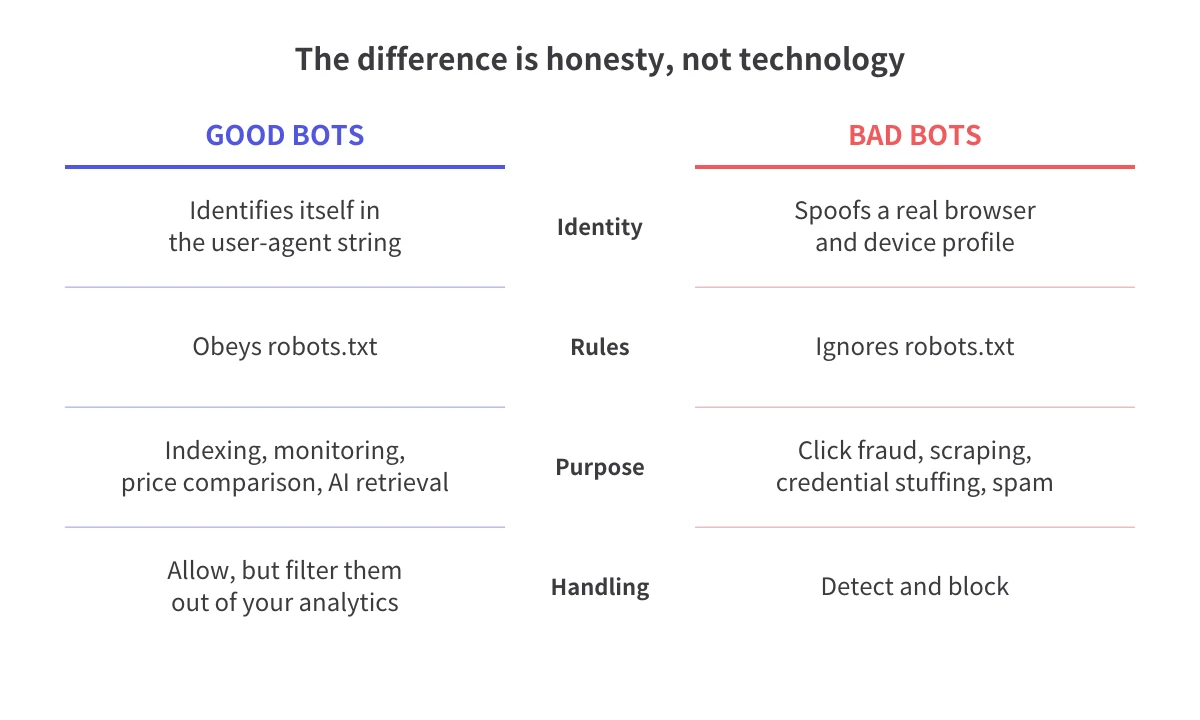
The practical difference is simple: good bots tell you who they are and respect the limits you set. Bad bots pretend to be people so that nothing stops them.
Good bots mess up your reporting. They don't cost you money. You want search crawlers on your site; you just don't want them counted as visitors.
Bad bots are the opposite. Some scrape content or test stolen passwords and never touch your ads. Others exist specifically to click paid placements — because every click moves money from an advertiser to whoever hosts the ad. For a fuller breakdown of the categories and the traffic each one produces, see our guide to the different types of bot traffic.
Where bad bots meet your ads matters as much as what they are. Made-for-advertising (MFA) sites are pages built to carry ads instead of serving readers. MFA inventory reached 14x the previous year's level in Spider AF's 2026 Ad Fraud White Paper — a 1,409% year-over-year index. These sites are where automated traffic and paid inventory overlap most often, which makes an unfamiliar MFA placement one of the first things to check in your placement report.
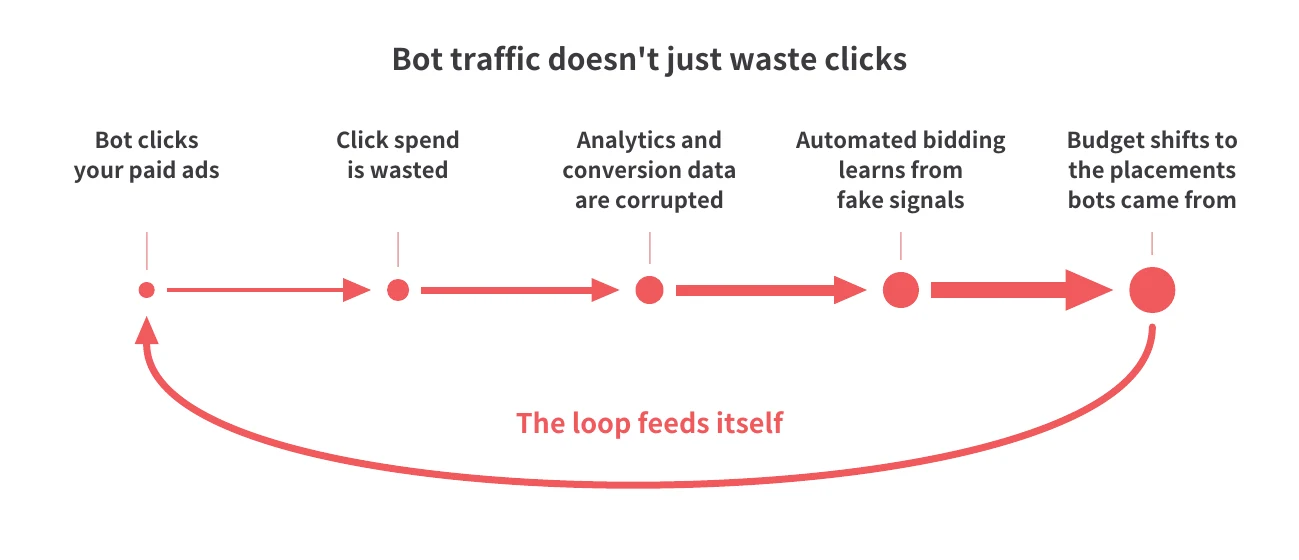
Bot traffic costs you more than the wasted clicks. It damages the decisions you make afterward, and those decisions are worth more than any single day of media spend.
1. You pay for clicks that could never convert. In a cost-per-click auction, the charge triggers on the click. A bot that loads your landing page and leaves has already cost you money. Nothing downstream recovers it.
2. Your measurement stops describing reality. Bot sessions inflate traffic, flatten engagement time, and drag down conversion rate. Spider AF's 2026 white paper data shows a 1.5x conversion rate gap between valid and invalid traffic — so the channel, creative, or audience carrying the most bot traffic looks like your worst performer even when the human traffic inside it is performing fine.
3. Bot form fills consume real hours. Automated submissions that arrive through your paid traffic land in the same inbox as genuine inquiries. Someone qualifies them, calls them, and writes them up. That cost never appears in a media report.
4. Your optimization learns the wrong lesson. Automated bidding and audience building run on the signals you send them, so bot activity shapes where your budget goes next.
That's why bot traffic compounds instead of staying flat, and it's the part most advertisers never see in a report.
Smart bidding optimizes toward the conversions and engagement events it receives. Remarketing audiences fill up with whoever triggered your tag. If a share of that activity is automated, the system builds a profile of a valuable user that partly describes a bot — and then goes looking for more traffic that matches it.
The result is a loop. Bot clicks generate signals. Signals shape bidding and audience targeting. Bidding pushes more budget toward the placements the bot clicks came from. Those placements deliver more of the same.
The loop matters because it survives your usual fixes. Pausing a keyword or swapping creative does nothing to a model that has already learned from polluted data. You have to feed the algorithm clean signals while it's still learning, which means filtering the traffic before it becomes a conversion event — not auditing it a month later.
AI-optimized delivery raises the stakes. Campaigns using it showed invalid traffic rates up to 5.2% in Spider AF's 2026 white paper data, roughly twice the platform average. The more of your buying you hand to an algorithm, the more your results depend on the quality of the signal you feed it.
You don't need a new tool to find your first evidence. These seven signals live in Google Analytics, your ad platform reports, and your CRM. Any one of them can have an innocent explanation; two or three together rarely do.
1. Sessions with zero engagement time. A real visitor who clicked an ad spends at least a few seconds on the page. A cluster of sessions at zero seconds, from the same source, is the clearest single signal.
2. Traffic spikes you didn't cause. Clicks jump 40% overnight with no budget change, no new creative, and no seasonality. Check whether the increase is concentrated in one placement or one geography.
3. Geography or language that doesn't match your targeting. If a US-only campaign is delivering sessions from regions you excluded, or the browser-language mix doesn't fit the market you're buying, the traffic is probably coming through proxies.
4. Data center IP addresses. Human users come from residential and mobile networks. They do not browse from hosting providers and cloud platforms, which makes data-center traffic one of the most reliable technical markers of automation.
5. Bounce and page-depth anomalies by placement. One publisher or app placement shows a near-100% bounce rate while everything else looks normal. Look at that placement before you blame your landing page.
6. Conversions that don't survive contact. Form fills are up, but connect rates and qualified-lead rates are down. Ask sales, not analytics — they know before your dashboard does.
7. Form behavior that isn't human. Three tells: submissions completed in under two seconds, fields filled in tab order every time, and identical user agents across dozens of entries. If most of your bot problem lands in forms, see how to stop bots from submitting your forms.
For the specific reports and filters to check next, see how to detect bot traffic in your ad campaigns and how to filter bot traffic in GA4.
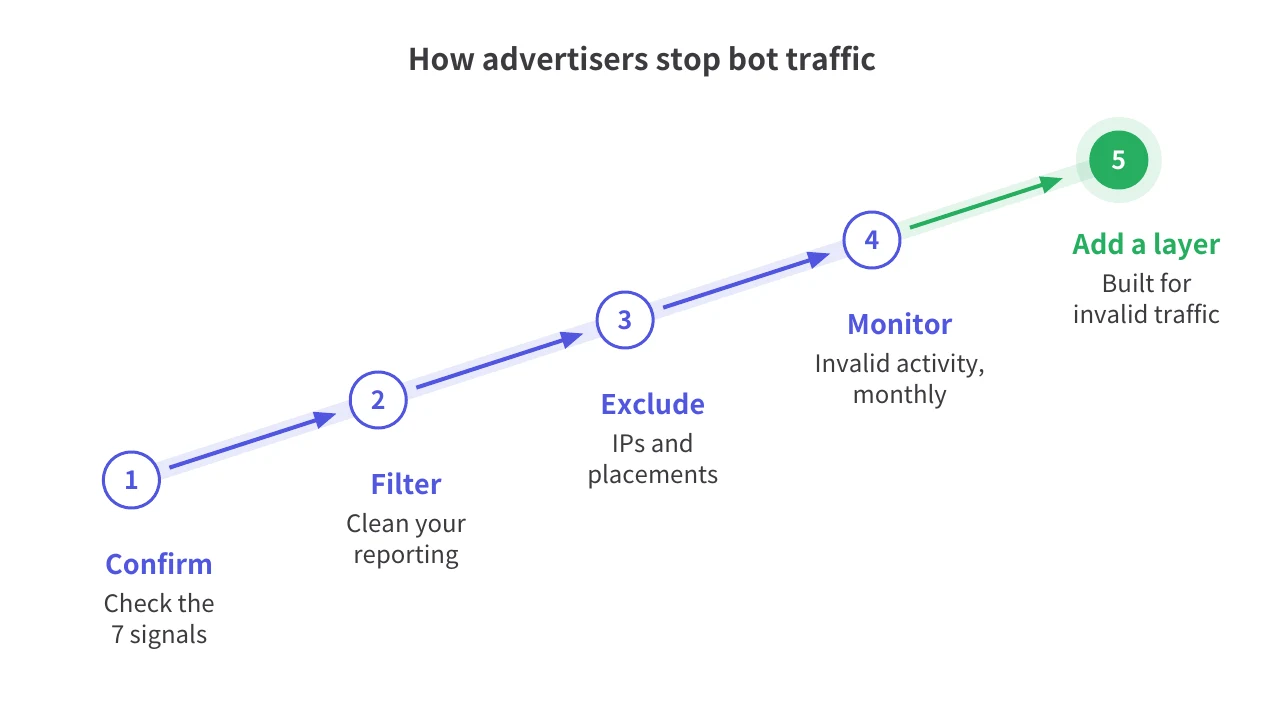
There are two separate playbooks here, and they solve different problems. Server-side controls protect your site; protecting the clicks you pay for takes exclusions in the ad platform and a layer built for invalid traffic — the five steps below. Confusing the two is the most expensive mistake advertisers make.
Related reading: Types of bot detection tools for advertisers
If you search for "how to stop bots" or "how to stop bot traffic," you'll mostly find server-side advice: add disallow rules to robots.txt, put a CAPTCHA or bot challenge on your forms, rate-limit requests by IP, and run a web application firewall.
Do all of it. It reduces scraping, blocks credential stuffing, keeps junk out of your forms, and lowers your hosting bill.
It also does nothing about the click you've already been charged for. Every one of those controls sits on your infrastructure, and every one of them runs after the click. The auction charged you at the moment of the click; your CAPTCHA fires several steps later, on your own server. The robots.txt file is a request, not a barrier, and the bots built for click fraud ignore it — the ones that honor it were never your problem.
Protecting ad spend means acting where the money moves: in the ad platform, and in the signals you feed it.
The platforms do filter some of it, and it's worth knowing exactly how far that filtering goes.
Google Analytics 4 automatically excludes traffic from known bots and spiders, using a combination of Google research and the International Spiders and Bots List maintained by the Interactive Advertising Bureau (IAB). Two details matter, both per Google's documentation: you can't disable that exclusion, and you can't see how much traffic it removes. On the ads side, Google's systems evaluate interactions for validity and issue adjustments or credits, not refunds — and both automated filtering and manual investigations are limited to traffic from the last 60 days.
The pattern is the same everywhere: list-based filtering catches the automated traffic that is already known and identifiable. The measurement industry calls that general invalid traffic (GIVT). The traffic that mimics a real browser, a real device, and a plausible click pattern is sophisticated invalid traffic (SIVT), and no list contains it, because it was built to stay off lists. Our breakdown of the types of invalid traffic, including GIVT and SIVT, covers where the line falls.
So the built-in filters give you a floor to stand on. Everything above it is your job.
Spider AF PPC Protection detects invalid clicks in real time and pushes IP and audience exclusions back to Google, Meta, and other major ad platforms. It works on the clicks you're billed for and the sessions those clicks produce, and it delivers both the exclusions and the evidence behind them.
Spider AF PPC Protection blocks invalid clicks in real time, so fewer bot interactions ever reach the signals your campaigns learn from.
Bot traffic is any click, visit, impression, or form submission on your website or ads that comes from an automated program instead of a person. Some of it is useful, like search engine crawlers. The portion that reaches your paid campaigns and charges you for clicks is the part that costs advertisers money.
Bot traffic is not inherently illegal — search crawlers and monitoring services are ordinary automated tools. Using bots to click ads, commit fraud, or gain unauthorized access may violate platform policies and, depending on the jurisdiction, computer fraud or advertising laws. For your own situation, consult a legal professional.
Yes. Google's systems evaluate ad interactions and filter out what they judge to be invalid, but the adjustment arrives as a credit rather than a refund. Both automated reviews and manual investigations are limited to the last 60 days. Traffic engineered to look human can pass those checks.
Bot traffic is the main source of invalid traffic, but invalid traffic is the broader term. It covers everything charged to an advertiser without genuine user interest, including accidental and duplicate clicks from real people. Bots are how most of it is generated at scale.

Crecimiento de MFA, riesgos de fraude impulsados por IA y cómo los principales anunciantes protegen sus presupuestos. PDF gratuito.


.png)