Your ad clicks are climbing while sales stay flat — and bots are the first thing you suspect. Before you buy a bot detection tool, judge it by what it does, not by its label. If invalid ad clicks are the problem, look for PPC protection that connects detection to exclusions in your ad platforms. Problems with site access, reporting, or ad impressions call for other kinds of tools.
Flat sales don't prove you have bots. Your targeting, offer, or landing page may need attention too. But search for bot detection software, and products built for very different jobs start to look interchangeable. The useful question is what changes after a tool flags traffic. A report, an analytics filter, a website restriction, and an ad platform exclusion each solve a different problem.
The right tool depends on where you need something to change: site access, analytics, ad clicks, or ad delivery. Every product page may say "bot detection," but each category solves its own problem.
Treat this as a practical buying framework rather than an official industry classification. Some products span more than one category, so look at what each one actually does. Identity verification and payment fraud prevention are outside the scope of this guide.
Related reading: Do you need ad verification, ad fraud detection, or both?
You may also have overlapping needs. If suspicious traffic affects both your reporting and your paid clicks, write down the action you need in each place. Then check whether one product covers both or leaves part of the work to another system.
Bot detection identifies automated activity. Click fraud protection deals with fraudulent clicks on your ads. PPC invalid traffic protection, often sold as PPC bot detection, covers more ground, including repeated clicks and other invalid clicks that aren't deliberate fraud.
Not every bot is harmful. Search engine crawlers and monitoring tools are automated for legitimate reasons, and detecting a bot doesn't mean it clicked an ad. For the basics, see what bot traffic is.
Human clicks can be invalid, too. Google's explanation of invalid traffic includes accidental clicks and deliberate interactions from people with no genuine interest in your ad. An accidental click is invalid, but it isn't fraud.
These distinctions change how you read a report. A flagged website visit, an invalid ad click, and a billed click are three different things. A report that flags automated website visits may help explain unusual traffic, but a flag on its own doesn't tell you whether a visit cost you money or qualifies for a billing adjustment.
When you talk results with your team or agency, pin down which one a report means: automation, suspected click fraud, or invalid ad traffic. Mixing up those labels is how teams end up buying a tool built for another problem.
Yes. Google Ads automatically removes invalid traffic from your campaign metrics and billing when it detects that traffic before your billing cycle ends. If Google identifies invalid activity after you've been billed, it issues credits where appropriate and possible.
Google says its defenses combine automated filters, machine learning, and manual reviews. Its About invalid traffic help page also notes that third-party monitoring tools "often flag invalid traffic that Google defenses already detected and filtered."
That overlap matters when you compare a bot detection dashboard with your Google Ads costs. A flagged click may be one Google already filtered, so a gap between the two reports doesn't prove that you're missing a credit or that Google's protections failed.
Keep these records apart. Google's "Invalid clicks" column shows clicks Google filtered. The Invalid Activity Credit Report shows credits applied to your account. An outside tool's count shows what that tool flagged.
A credit is a billing adjustment, not a cash refund, and no tool can guarantee that Google will issue one. Google also says its investigations don't analyze or validate third-party data, so a third-party report isn't a ticket to a credit.
Exclusions and credits aren't substitutes. An exclusion tells the ad platform to stop showing your ads to certain traffic; a credit adjusts what you've already been billed. Sending an exclusion doesn't settle the bill, and a credit doesn't stop the next click.
To decide whether you need more than Google's own filtering, see whether Google's built-in protection is enough.
Before you compare products, confirm what each tool examines and what changes after it flags something. Then decide who will review its decisions. A product page that says it "protects advertisers" doesn't tell you whether the tool changes reports, applies exclusions, or helps you understand billing.
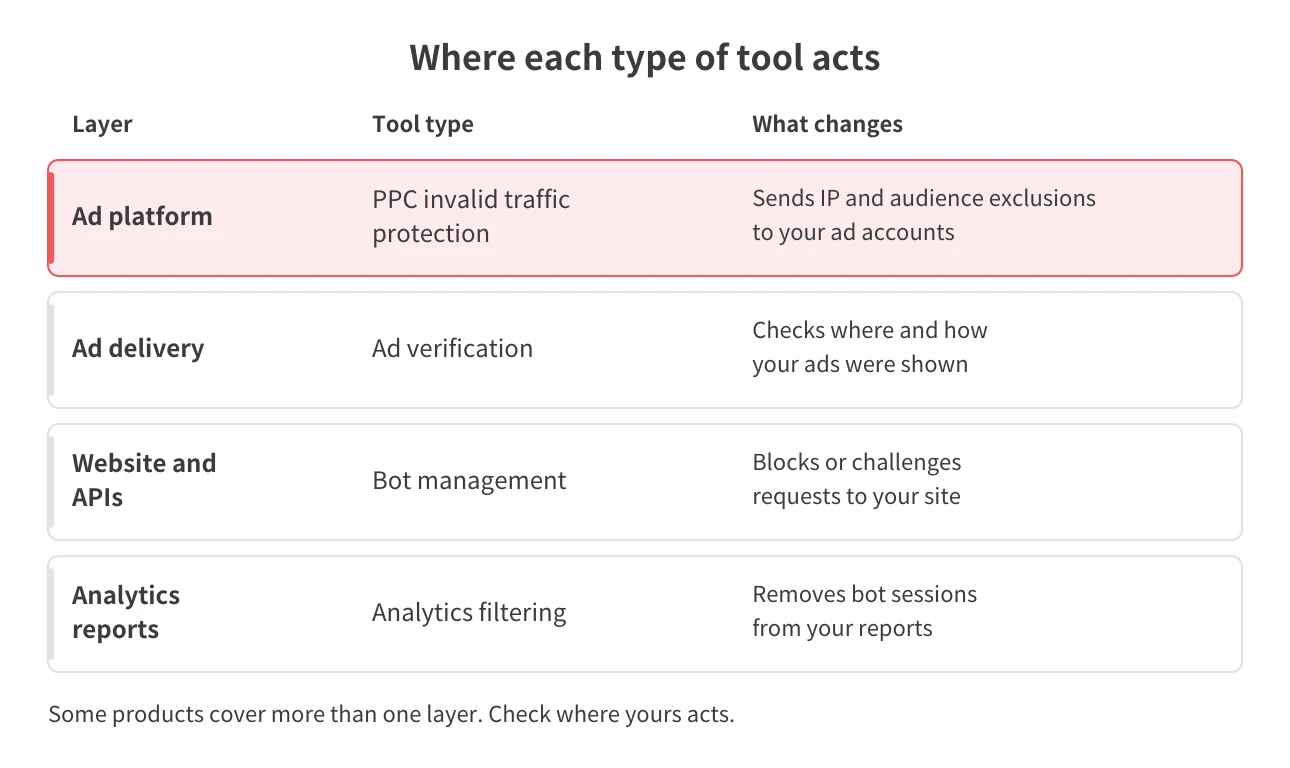
Start with the event the tool examines: a website visit, an ad click, an analytics event, or an ad impression. A report that only flags suspicious site visits may not tell you which sources to exclude in your ad platform.
Next, find out what the tool does with what it finds. Detection labels activity for review. Analytics filtering changes what shows up in your reports. Exclusions tell your ad platform to stop showing your ads to the excluded IPs or audiences. One product may do several of these, but don't assume that flagging suspicious traffic triggers all of them.
Website restrictions need the same scrutiny. If a tool limits access after someone clicks your ad, the click has already happened. What matters is whether anything changes inside the ad platform.
A provider should be able to explain, in plain language, how a finding turns into an action. If the explanation ends at a dashboard alert, nothing has changed in your ad accounts yet.
Not sure you even have a bot problem? Start with how to check your ads and website for bot traffic. Understanding the problem first helps you pick the right category — and keeps you from treating weak campaign performance as proof of bots.
Decide who reviews flagged traffic before you choose a tool that acts on it. Marketing, analytics, and website security teams need different evidence, because a wrong call affects each team's work in its own way.
A false positive happens when legitimate activity gets flagged. What it costs you depends on what happens next. A label in a report just needs a second look, while an applied exclusion can affect which real prospects see your ads.
Ask each provider what evidence a reviewer can see and how you can challenge a call you disagree with. Can the person who owns the account see why something was flagged? Who decides whether the resulting action makes sense for your business? Don't assume every product handles this the same way.
If you work at an agency, agree with your client on who reviews the findings and who can approve changes to the ad accounts or website controls. Those may be two different people.
Big detection counts don't answer any of these questions, and neither does a claimed accuracy figure. Choose a tool whose actions match your problem and whose decisions your team can understand and review.
If invalid ad clicks are your problem and you want detection to turn into exclusions inside your ad platforms, Spider AF PPC Protection fits. It's the kind of bot detection for ads that works inside your ad accounts, not on your website. Login attacks, scraping, and sitewide bot management are outside its scope.
Spider AF PPC Protection detects invalid clicks in real time and pushes IP and audience exclusions back to Google, Meta, and other major ad platforms. Detection feeds straight into your exclusions, so you aren't exporting lists and uploading them by hand.
Its exclusion list shows each blocked IP with its detection reason, backed by detailed fraud logs and fraud summary reports. That gives whoever reviews flagged traffic something concrete to check.
You also see the findings before anything is excluded. During the 14-day free trial, you add the Spider AF tag to your landing pages and connect your ad accounts, and Spider AF measures invalid traffic across Search, Performance Max, Display, and social campaigns without blocking anything. Blocking starts when you move to a paid plan, so you can check the findings against your own account first.
In one of our case studies, a Vienna emergency locksmith cut invalid ad clicks by 90%. That's one advertiser's result, and yours will depend on your account. See how a Vienna locksmith reduced invalid clicks.
Pick the category that matches your problem, then compare software within it. If you're still not sure where the problem sits, pin that down before you shortlist products.
A useful requirement names both the activity and the action. "Identify invalid ad clicks and send exclusions to our ad platforms" points to PPC protection. "Remove automated visits from our reports" points to analytics filtering. Traffic that looks similar can lead to different requirements.
Factor in what your ad platform already does. Google's filtering and billing adjustments are part of the picture, and an outside tool's count can't stand in for them. When you compare PPC protection tools, look for useful detail on flagged clicks and exclusions that update automatically. That's the part Google's own filtering doesn't give you.
Once you know you need ad platform exclusions, compare products within that category, or test Spider AF in your own ad account first.
If you need to detect invalid ad clicks and send exclusions to your ad platforms, look at PPC invalid traffic protection. Before you buy, confirm what the tool examines and what happens after it flags a click. Check what your ad platform already filters so you know what the tool would add.
Not automatically, because blocking site access and excluding traffic in your ad platforms are separate actions. Restricting access after an ad click doesn't undo the click. Check what the product actually changes inside your ad platform.
No. A click flagged as bot traffic doesn't prove you paid for invalid activity, because Google may have filtered it before billing or credited it later. Check your billing records and credits before you count a flagged click as wasted spend.
Yes, bot detection tools can flag legitimate visitors by mistake. The impact depends on whether the tool only reports a finding or applies an exclusion. Check what evidence supports each decision and who can review disputed findings before you rely on automated actions.
No. Spider AF PPC Protection handles invalid ad clicks through real-time detection and ad platform exclusions. Login protection, scraping prevention, and sitewide bot management are outside its scope, so look to website and API bot management tools for those.

MFA growth, AI-driven fraud risks, and how top advertisers are protecting their budgets. Free PDF!



.png)