Spider AF /
Resources /
Articles /
Multiple Clicks Click Fraud: How to stop repeat clicks from draining your PPC
Ad Fraud 101
RESEARCH
May 13, 2026

Multiple Clicks Click Fraud: How to stop repeat clicks from draining your PPC

In this article

01
What is a click farm?
01
What is a click farm?
01
What is a click farm?
01
What is a click farm?
01
What is a click farm?
Quick take · 30-second version

Click farms aren't a fringe problem — they're a budget line item.

  • What they are: Networks of real (or human-supervised) devices generating fraudulent clicks, form fills, and engagement at scale.
  • Why they're hard to catch: Modern farms pass CAPTCHAs, simulate mouse movement, and rotate IPs — they look human in your analytics.
  • What they cost you: Wasted spend, polluted bidding-algorithm training data, and false-signal-driven decisions about your audience.
  • The fix: Real-time detection at the click event, plus auto-sync to your ad-platform exclusion lists. Manual IP blocklists can't keep up.

“Multiple clicks click fraud” happens when the same person, device, or bot clicks your ads repeatedly to waste budget or skew optimization signals. It’s a common subset of invalid traffic that quietly erodes performance in Google Ads, Microsoft Advertising, and paid social. If you’ve ever seen spikes of clicks from the same IP or device with zero engagement and no conversions, you’ve felt it.

Why it matters now: platforms increasingly rely on automated bidding and placement optimization. Repeated fake clicks poison those models, pushing spend toward pockets of low‑quality inventory and away from real buyers. Platforms do remove many invalid clicks automatically, but gaps remain. Google defines invalid clicks as those “that aren’t the result of genuine user interest,” including duplicate and accidental clicks, bot activity, and malicious manual clicks. Google does not charge for detected invalid activity, yet advertisers still see wasted spend when fraud slips past filters.

Meanwhile, attackers are getting better. Recent investigations uncovered large‑scale ad fraud operations that generated fake ad views and clicks via malicious app code and hidden webviews, showing how quickly techniques evolve beyond simple manual repeat clicking.

This guide explains how repeated‑click attacks work, how to detect them fast, and how to stop them. We’ll also show where Spider AF fits into a layered defense that protects your budget, data quality, and conversion rates.

What is “multiple clicks click fraud”?

Repeated‑click fraud is a pattern of illegitimate, non‑converting clicks coming multiple times from the same source (IP, device, fingerprint, cookie, or user account) within abnormal time windows. It typically stems from:

  • Bots or scripts designed to click the same ad many times.
  • Click farms assigned to “hammer” competitive keywords.
  • “Misclick” placements (crowded, cluttered pages) that induce accidental repeat taps.
  • Competitors or bad actors manually clicking to burn budget.

Platforms run their own detection, but advertisers still benefit from independent monitoring and proactive blocking. Microsoft Advertising, for example, describes continuous improvements in identifying invalid clicks and encourages advertisers to report suspicious activity for credits.

Why repeated clicks damage ROI (with fresh data)

According to Spider AF's 2025 Ad Fraud White Paper, click spamming accounts for 76.6% of invalid clicks, and the average ad fraud rate across channels was 5.1% in 2024.
According to Spider AF's 2025 Ad Fraud White Paper, valid clicks converted at roughly double the rate of invalid clicks (2.54% vs. 1.29%) across a study of 324 companies, underscoring how filtering bad clicks improves lead quality and revenue.

That gap creates two compounding harms:

  1. Budget waste: repeated fake clicks drain daily budgets and suppress impression share for real prospects.
  2. Optimization drift: auto‑bidding models learn from the clicks you pay for; repeated invalid clicks pollute training data and steer delivery toward poor placements.

How to detect repeated‑click attacks early

1) Look for high‑frequency patterns

  • Surges of ≥3–5 clicks from the same IP/device within minutes with near‑zero dwell time.
  • Click bursts at odd hours relative to your market, especially on a narrow set of placements or search partners.

2) Correlate with engagement and CVR

  • Repeated clicks with sub‑second page engagements, high bounce, or no events.
  • Campaigns showing rising CPC and CTR but flat or falling CVR.

3) Check placement quality

  • MFA‑style pages (made for advertising) and cluttered placements generate misclicks that look like repeat clicks.
  • Exclude domains or apps with abnormal click‑to‑conversion ratios.

4) Verify against platform reports

  • In Google Ads, add “Invalid clicks” columns to spot what the platform already filtered, then compare to your server‑side or third‑party logs to estimate residual risk.

Platform‑level prevention that helps right now

  • Tighten geo and schedule: limit delivery to proven markets and business hours to reduce bot windows.
  • Turn off poor networks/placements: review search partners and placement exclusions when fraud patterns cluster there.
  • Cap impressions and monitor audiences: frequency caps can reduce accidental repeats on display/video.
  • Use IP and audience exclusions: push known‑bad IPs and suspicious audiences out of delivery (Google supports IP exclusions; Meta supports audience exclusions).

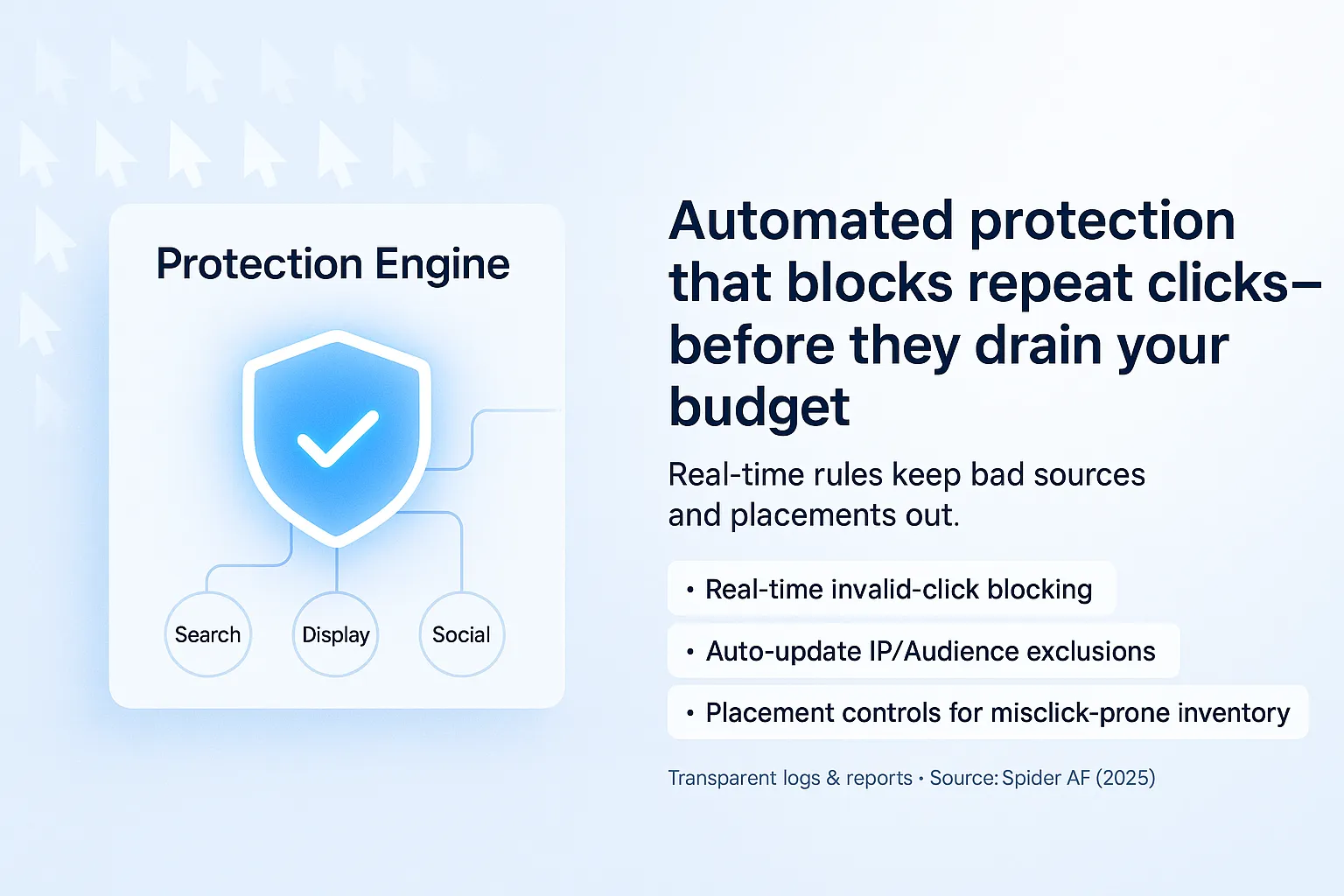
Automated protection with Spider AF (blocks repeat clicks before they cost you)

A purpose‑built layer catches and blocks repeat‑click patterns faster than manual checks:

  • Real‑time invalid click blocking: Spider AF watches each click on‑site via a lightweight script and automatically updates IP and audience exclusions on connected ad networks (Google via IP/audience; social via audience exclusions).
  • Placement controls for P‑Max and Display: auto‑detect and block non‑brand‑safe and MFA‑style placements that trigger misclicks and repeat taps.
  • Transparent logs: detailed invalid‑click logs and campaign‑level reports help you see exactly what was blocked and why, and estimate cost savings.

Bonus: if your goal is lead generation, repeated clicks often pair with fake form submits. Spider AF’s Fake Lead Protection integrates with your CRM to flag and block those bad conversions in real time, cleaning optimization signals end‑to‑end. According to Spider AF's 2025 Ad Fraud White Paper, organic channels can see fake lead rates as high as 4.06% versus 0.91% on paid, reinforcing the need to guard all inbound sources.

Security note: script tampering can trigger “repeat click” symptoms

If your site tags or third‑party scripts are compromised, attackers can inject code that drives accidental clicks or exfiltrates form data. Spider AF SiteScan inventories and monitors client‑side scripts, detects tampering, and tracks data exfiltration destinations—useful for PCI DSS 4.0.1 client‑side controls and to reduce misclick risk from rogue tags.

Conclusion & next steps

Repeated‑click fraud quietly drains budgets and corrupts optimization. Pair platform hygiene (IP/audience exclusions, schedule and geo tightening, placement reviews) with automated, real‑time enforcement.

Start with Spider AF PPC Protection to block repeat clicks and bad placements automatically, protect bidding models, and recover ROI: https://spideraf.com/ppc-protection
If you capture leads, add Fake Lead Protection to purge fake conversions from your CRM signals: https://spideraf.com/fake-lead-protection
Concerned about script risk? Scan and monitor client‑side tags with SiteScan: https://spideraf.com/sitescan

FREE SCAN

See your account's invalid traffic in 24 hours.

Spider AF will quantify exactly how much of your last 30 days of paid spend went to bots and click farms.

No credit card
1-line install
Cancel any time
Or book a 20-min demo
FAQ

People also ask.

Q 01 Are click farms illegal? +
In most jurisdictions, click farms violate ad-network terms of service and consumer-protection laws — but enforcement is patchy and cross-border. The FTC has taken action against fake-engagement operations, and Japan's METI has issued guidance treating fake reviews and bot traffic as deceptive practices. The practical reality: legal action is slow; technical blocking is fast.
Q 02 How is a click farm different from a botnet? +
Click farms typically use real humans (or human-supervised devices) to evade behavioral detection — they pass CAPTCHAs, mimic mouse movement, even simulate purchase journeys. Botnets are fully automated and easier to fingerprint. Modern fraud usually blends both: bots for volume, human "supervisors" for the high-value clicks.
Q 03 Can Google Ads or Meta detect click farms on their own? +
Both networks credit obviously-invalid clicks, but their detection runs on aggregated, post-hoc statistical signals — they refund days or weeks later. By then, your bidding algorithms have already optimized toward the polluted data. Independent, real-time detection at the click layer is what closes the loop.
Q 04 Will blocking click-farm traffic hurt my reach? +
No. Blocking invalid clicks only removes traffic that was never going to convert. The downstream effect is usually the opposite — your bidding model gets cleaner training signal and starts spending more on audiences that actually convert.
Q 05 How fast can Spider AF block click-farm traffic? +
Sub-200ms detection at the click event, with auto-sync to Google, Meta, TikTok, and Microsoft exclusion lists in seconds. Most accounts see meaningful blocking within 24 hours of installing the tag.

Multiple Clicks Click Fraud: How to stop repeat clicks from draining your PPC

Table of Contents

“Multiple clicks click fraud” happens when the same person, device, or bot clicks your ads repeatedly to waste budget or skew optimization signals. It’s a common subset of invalid traffic that quietly erodes performance in Google Ads, Microsoft Advertising, and paid social. If you’ve ever seen spikes of clicks from the same IP or device with zero engagement and no conversions, you’ve felt it.

Why it matters now: platforms increasingly rely on automated bidding and placement optimization. Repeated fake clicks poison those models, pushing spend toward pockets of low‑quality inventory and away from real buyers. Platforms do remove many invalid clicks automatically, but gaps remain. Google defines invalid clicks as those “that aren’t the result of genuine user interest,” including duplicate and accidental clicks, bot activity, and malicious manual clicks. Google does not charge for detected invalid activity, yet advertisers still see wasted spend when fraud slips past filters.

Meanwhile, attackers are getting better. Recent investigations uncovered large‑scale ad fraud operations that generated fake ad views and clicks via malicious app code and hidden webviews, showing how quickly techniques evolve beyond simple manual repeat clicking.

This guide explains how repeated‑click attacks work, how to detect them fast, and how to stop them. We’ll also show where Spider AF fits into a layered defense that protects your budget, data quality, and conversion rates.

What is “multiple clicks click fraud”?

Repeated‑click fraud is a pattern of illegitimate, non‑converting clicks coming multiple times from the same source (IP, device, fingerprint, cookie, or user account) within abnormal time windows. It typically stems from:

  • Bots or scripts designed to click the same ad many times.
  • Click farms assigned to “hammer” competitive keywords.
  • “Misclick” placements (crowded, cluttered pages) that induce accidental repeat taps.
  • Competitors or bad actors manually clicking to burn budget.

Platforms run their own detection, but advertisers still benefit from independent monitoring and proactive blocking. Microsoft Advertising, for example, describes continuous improvements in identifying invalid clicks and encourages advertisers to report suspicious activity for credits.

Why repeated clicks damage ROI (with fresh data)

According to Spider AF's 2025 Ad Fraud White Paper, click spamming accounts for 76.6% of invalid clicks, and the average ad fraud rate across channels was 5.1% in 2024.
According to Spider AF's 2025 Ad Fraud White Paper, valid clicks converted at roughly double the rate of invalid clicks (2.54% vs. 1.29%) across a study of 324 companies, underscoring how filtering bad clicks improves lead quality and revenue.

That gap creates two compounding harms:

  1. Budget waste: repeated fake clicks drain daily budgets and suppress impression share for real prospects.
  2. Optimization drift: auto‑bidding models learn from the clicks you pay for; repeated invalid clicks pollute training data and steer delivery toward poor placements.

How to detect repeated‑click attacks early

1) Look for high‑frequency patterns

  • Surges of ≥3–5 clicks from the same IP/device within minutes with near‑zero dwell time.
  • Click bursts at odd hours relative to your market, especially on a narrow set of placements or search partners.

2) Correlate with engagement and CVR

  • Repeated clicks with sub‑second page engagements, high bounce, or no events.
  • Campaigns showing rising CPC and CTR but flat or falling CVR.

3) Check placement quality

  • MFA‑style pages (made for advertising) and cluttered placements generate misclicks that look like repeat clicks.
  • Exclude domains or apps with abnormal click‑to‑conversion ratios.

4) Verify against platform reports

  • In Google Ads, add “Invalid clicks” columns to spot what the platform already filtered, then compare to your server‑side or third‑party logs to estimate residual risk.

Platform‑level prevention that helps right now

  • Tighten geo and schedule: limit delivery to proven markets and business hours to reduce bot windows.
  • Turn off poor networks/placements: review search partners and placement exclusions when fraud patterns cluster there.
  • Cap impressions and monitor audiences: frequency caps can reduce accidental repeats on display/video.
  • Use IP and audience exclusions: push known‑bad IPs and suspicious audiences out of delivery (Google supports IP exclusions; Meta supports audience exclusions).

Automated protection with Spider AF (blocks repeat clicks before they cost you)

A purpose‑built layer catches and blocks repeat‑click patterns faster than manual checks:

  • Real‑time invalid click blocking: Spider AF watches each click on‑site via a lightweight script and automatically updates IP and audience exclusions on connected ad networks (Google via IP/audience; social via audience exclusions).
  • Placement controls for P‑Max and Display: auto‑detect and block non‑brand‑safe and MFA‑style placements that trigger misclicks and repeat taps.
  • Transparent logs: detailed invalid‑click logs and campaign‑level reports help you see exactly what was blocked and why, and estimate cost savings.

Bonus: if your goal is lead generation, repeated clicks often pair with fake form submits. Spider AF’s Fake Lead Protection integrates with your CRM to flag and block those bad conversions in real time, cleaning optimization signals end‑to‑end. According to Spider AF's 2025 Ad Fraud White Paper, organic channels can see fake lead rates as high as 4.06% versus 0.91% on paid, reinforcing the need to guard all inbound sources.

Security note: script tampering can trigger “repeat click” symptoms

If your site tags or third‑party scripts are compromised, attackers can inject code that drives accidental clicks or exfiltrates form data. Spider AF SiteScan inventories and monitors client‑side scripts, detects tampering, and tracks data exfiltration destinations—useful for PCI DSS 4.0.1 client‑side controls and to reduce misclick risk from rogue tags.

Conclusion & next steps

Repeated‑click fraud quietly drains budgets and corrupts optimization. Pair platform hygiene (IP/audience exclusions, schedule and geo tightening, placement reviews) with automated, real‑time enforcement.

Start with Spider AF PPC Protection to block repeat clicks and bad placements automatically, protect bidding models, and recover ROI: https://spideraf.com/ppc-protection
If you capture leads, add Fake Lead Protection to purge fake conversions from your CRM signals: https://spideraf.com/fake-lead-protection
Concerned about script risk? Scan and monitor client‑side tags with SiteScan: https://spideraf.com/sitescan

SpiderAF
アドフラウド
Spider Labs